
Shopping for a prebuilt that already handles cooling and cable management is a different exercise than pricing out parts one at a time. The Thermaltake Arctic i360T R4 puts a 12th Gen Intel Core i5-12600KF behind a 360mm closed-loop cooler and wraps the whole thing in a white open-frame chassis with thick tempered glass.
This Thermaltake Arctic i360T R4 review focuses on what the hardware delivers at 1080p, how the liquid cooling holds up over time, and where the case design limits your upgrade options later.
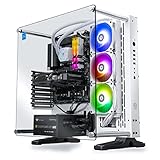
- Intel Core i5-12600KF CPU Watercooled, Intel Z690 Chipset ATX motherboard, 16GB ToughRam DDR4 RGB, 1TB NVMe M.2, WiFi, Windows 10 Home
- NVIDIA GeForce RTX 3060 Ti, 3x Display Port/1x HDMI
- Closed Loop Liquid Cooling with 360mm Radiator

An RTX 3060 Ti with 8GB of GDDR6, 16GB of Toughram DDR4 at 3600MHz, and a 1TB NVMe M.2 drive round out the build. Wi-Fi 6E comes through the Z690 motherboard, and a keyboard and mouse ship in the box.
Bottom Line
If you want a well-cooled 1080p gaming desktop that looks the part on an open desk and skips the assembly work, this configuration earns its place.
Check current availability and pricing on Amazon.
Thermaltake Arctic i360T R4 Overview
Thermaltake built this machine around its own case, cooler, memory, and power supply, which explains why the parts fit together as cleanly as they do. The Z690 chipset supplies PCIe Gen4 lanes and Wi-Fi 6E, while the white P3 open-frame chassis leaves the internals on display behind a 5mm tempered glass panel.
Windows 10 Home ships preinstalled. Ports on the front cover two USB 3.0 and two USB 2.0 connections, plus headphone and microphone jacks.
| Component | Specification |
|---|---|
| CPU | Intel Core i5-12600KF (10 cores) |
| GPU | NVIDIA GeForce RTX 3060 Ti, 8GB GDDR6 |
| Memory | 16GB Toughram DDR4 3600MHz |
| Storage | 1TB NVMe M.2 SSD |
| Cooling | 360mm AIO closed-loop liquid |
| Networking | Wi-Fi 6E |
Who Is This Gaming Desktop Best For?
Players running a single 1080p monitor at high refresh rates get the most out of this configuration. The 3060 Ti and i5-12600KF pairing suits competitive shooters and mainstream AAA titles without pushing you toward a 1440p or 4K panel.
It also fits anyone who wants a liquid cooled gaming PC without mounting a radiator themselves. Buyers planning heavy internal expansion later should read the upgrade section first.
Intel Core i5-12600KF Gaming Performance
Ten cores split into six performance and four efficient cores give this chip real headroom in games and background tasks alike. The 12600KF was Intel’s value champion in the Alder Lake stack, and it still keeps pace with modern GPUs at 1080p without becoming the bottleneck.
The unlocked multiplier means overclocking headroom exists, and the 360mm radiator gives you the thermal budget to use it. Under sustained load, core temperatures stay well clear of throttling territory in a room at normal ambient temperature.
The KF suffix means no integrated graphics. Lose the discrete card and you lose display output entirely, which matters only during troubleshooting.
What Can the 10-Core Processor Handle?
Streaming while gaming works without stutter, since the efficiency cores absorb encoding and Discord overhead. Video editing in 1080p timelines, Lightroom exports, and code compilation all run comfortably.
Simulation-heavy titles that lean on CPU threads, such as Cities: Skylines II, Microsoft Flight Simulator, and large Total War battles, benefit most from the core count here.
NVIDIA GeForce RTX 3060 Ti Graphics
The 3060 Ti sits a clear step above the standard 3060 in raster performance, trading the 12GB frame buffer for a wider memory bus and more CUDA cores. Its 8GB of GDDR6 handles 1080p textures at maximum settings in nearly every current release.
Three DisplayPort outputs plus one HDMI let you run a multi-monitor setup without adapters. DLSS support extends the card’s useful life in newer titles that lean on upscaling.
Ray tracing works, though enabling it in demanding games usually means dropping to DLSS Quality mode to hold 60 fps.
Is It Still a Good Choice for 1080p Gaming?
Yes, particularly for high-refresh 1080p play. Esports titles clear 200 fps, and recent AAA games hold 70 to 100 fps at high settings.
If you compare it against the MSI Gaming GeForce RTX 3060 12GB, the Ti wins on frame rates while the non-Ti wins on VRAM capacity. At 1080p, frame rates matter more; at 1440p with heavy texture packs, the 8GB buffer starts to show its age.
360mm Liquid Cooling and Open-Frame Design
A full 360mm radiator on a 125W-class processor is generous, and the results show up as low fan speeds during normal gaming. The closed-loop unit ships preassembled and prefilled, so no maintenance is required beyond dusting the fins.
The white P3 chassis uses an open-frame layout with a single thick tempered glass panel rather than a fully enclosed box. Airflow benefits, and so does the visual effect of the RGB memory and pump block.
Compared with standalone units like the Cooler Master 360 Atmos White, this integrated setup gives up some fan tuning flexibility in exchange for zero installation work.
How Does the Panoramic Tempered-Glass Case Affect Everyday Use?
Dust accumulates faster than in a filtered enclosed case, so plan on using compressed air every couple of months. The open sides also mean fan noise reaches your ears more directly, though the large radiator keeps RPMs low enough that it stays unobtrusive.
The glass panel arrives well protected in shipping. Owners report the case surviving rough delivery handling with only minor cosmetic marks on the rear panel.
Storage, Memory, and Connectivity
A 1TB NVMe M.2 drive on PCIe Gen4 handles Windows plus a healthy game library, with sequential speeds that cut level load times noticeably against SATA SSDs. Two of the four DIMM slots hold the 16GB Toughram kit at 3600MHz, leaving two open and a 128GB ceiling.
Wi-Fi 6E on the Z690 board delivers 6GHz band access if your router supports it. Wired networking remains the better choice for competitive play.
Four USB ports on the front, two 3.0 and two 2.0, plus headphone and mic jacks cover peripherals without a hub for most setups.
What Comes Ready to Use Out of the Box?
Windows 10 Home is preinstalled and activated, and a QWERTY keyboard and mouse ship alongside the tower. Plug in a monitor via DisplayPort or HDMI, connect power, and you reach the desktop in minutes.
You supply the display and any wired network cable. Games download over Wi-Fi 6E without issue on a decent connection.
Upgrade Access and Long-Term Ownership
The motherboard and memory upgrade paths are straightforward: two free DIMM slots, five expansion slots, and a standard ATX Z690 board that accepts any LGA1700 processor from the 12th or 13th Gen lines. Swapping the GPU later is a normal PCIe operation.
The case design complicates one specific task. Adding 2.5-inch or 3.5-inch drives behind the rear panel is difficult because the panel does not detach the way most cases allow, and at least one owner discovered this after removing every visible screw.
Thermaltake covers the system with a one-year manufacturer warranty.
What Should Buyers Know Before Expanding Storage?
Plan storage growth around M.2 slots and external drives instead of internal 2.5-inch bays. A second NVMe drive installs on the motherboard without touching the rear panel, and a USB enclosure covers bulk media.
For long-term archives, pairing the internal SSD with a proper backup strategy and reliable storage solutions is the practical approach here.
Pros and Cons
Value drives the case for this machine, since the component list adds up to more than the assembled system commands at typical sale pricing.
Pros
- 360mm AIO keeps the i5-12600KF cool and quiet under load
- Component total exceeds the assembled system’s usual price
- Wi-Fi 6E and PCIe Gen4 via the Z690 chipset
- Open-frame white chassis with genuine 5mm tempered glass
- Keyboard, mouse, and activated Windows included
- Two free DIMM slots with a 128GB ceiling
Cons
- Rear panel does not detach, blocking 2.5-inch drive installation
- Ships with Windows 10 rather than a current Windows release
- 8GB VRAM limits headroom at 1440p and above
- One-year warranty is shorter than some competitors offer
- Open frame collects dust faster than a filtered enclosure
Customer Reviews and Real-World Feedback
Feedback skews positive, with packaging quality and out-of-box condition coming up repeatedly across owner accounts. Several buyers who bought during price drops described the component value as strong relative to sourcing the parts individually.
Shipping protection earns specific praise. Multiple owners noted external box damage from carriers with no corresponding harm to the tower or its glass panel.
What Owners Like Most
The visual design draws consistent comments, particularly from buyers who chose the white version. Enthusiasts who already build their own systems described the specification sheet as competitive enough to skip a custom build.
One long-term owner reported two years of trouble-free gaming use before any component issue appeared.
Common Concerns From Verified Buyers
Storage expansion is the most concrete complaint. A buyer removed the rear panel screws expecting access and found the panel fixed in place.
One order arrived as the wrong configuration, so verifying the model on delivery is worth the two minutes. A separate owner had an AIO pump fail at roughly the 18-month mark and received a replacement cooler from Thermaltake within a week.
Conclusion
This build makes the most sense for a 1080p gamer who wants strong cooling and a display-worthy chassis without sourcing and assembling parts. The i5-12600KF and RTX 3060 Ti combination handles current titles at high settings, and the 360mm radiator gives the CPU room for overclocking that smaller coolers cannot support.
Check the model number against your order confirmation when the box arrives, and plan any storage expansion around the second M.2 slot. If you need internal 2.5-inch bays or a 1440p-capable frame buffer, look at other configurations before committing.
Frequently Asked Questions
Is the Thermaltake Arctic i360T R4 good for gaming?
Yes, this system handles 1080p gaming at high settings across current AAA and esports titles. The i5-12600KF supplies enough CPU throughput to keep the RTX 3060 Ti fed at high refresh rates, and the 360mm cooler prevents thermal throttling during long sessions.
What games can the RTX 3060 Ti run on this desktop?
Competitive titles like Valorant, CS2, and Apex Legends run well past 144 fps at 1080p. Demanding releases such as Cyberpunk 2077 and Alan Wake 2 need DLSS enabled to hold 60 fps with ray tracing, though they run comfortably at high settings without it.
Can the Thermaltake Arctic i360T R4 be upgraded?
Memory, GPU, and CPU upgrades are all straightforward on the standard ATX Z690 board, with two open DIMM slots supporting up to 128GB. Adding 2.5-inch or 3.5-inch drives is impractical because the rear panel does not detach, so route extra storage through the motherboard’s M.2 slot or external drives.
Does the Thermaltake Arctic i360T R4 include Wi-Fi?
Yes, the Z690 motherboard includes Wi-Fi 6E with 802.11ax support and access to the 6GHz band. An Ethernet port is available on the board for lower-latency wired connections during competitive play.
Is the 360mm liquid cooler reliable for long-term use?
The closed-loop unit requires no refilling or maintenance beyond keeping the radiator fins clear of dust. Pump failures can happen with any AIO, of course, and one owner whose pump failed around the 18-month mark received a replacement from Thermaltake within a week of contacting support.
TechBytes

Our mission is to showcase the complex world of technology with comprehensive, accessible reviews. We bring you the freshest insights on everything from the most streamlined smartphones to the mightiest laptops, as well as the latest in smart home gadgets that simplify your daily routine and fitness wearables that monitor your well-being. Rest assured, we're here to guide you through the ever-evolving tech landscape.


