
Upgrading storage is one of the few PC changes you feel immediately, and the Samsung 970 EVO Plus 2TB has spent years as the drive people reach for when they want a fast M.2 SSD without paying Gen 4 prices. It slots into a standard M.2 2280 socket, uses Samsung’s V-NAND and nickel-coated controller, and reaches sequential reads of up to 3,500 MB/s.
If your motherboard tops out at PCIe 3.0, this drive extracts close to everything that interface can deliver, and 2TB gives you room for Windows, a full Steam library, and a working project folder at once.
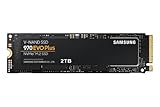
- Always Evolving SSD: The 970 EVO Plus is powered by the latest V-NAND technology and firmware optimization, maximizing the potential of NVMe bandwidth; Comes in storage capacities of up to 2TB, with reliability of up to 1,200 TBW.Computer Platform:PC.Internal Storage : Samsung V-NAND 3-bit MLC. Voltage : 3.3 V 5 % Allowable voltage.Allowable Voltage : 3.3 V 5 % Allowable voltage.
- Breakthrough Read/Write Speeds: The 970 EVO Plus reaches sequential read/write speeds up to 3,500/3,300 MB/s, up to 53% faster than the 970 EVO
- Samsung Magician for Data Security: This software provides a suite of user-friendly tools that help you keep your drive up to date, monitor drive health and speed, and even boost performance

Sequential writes reach up to 3,300 MB/s, endurance is rated at 1,200 TBW on the 2TB model, and Samsung Magician handles firmware, health checks, and cloning. Dynamic Thermal Guard watches temperatures during long transfers to keep throttling in check.
Bottom Line
For a PCIe 3.0 system, or any build where reliability and mature firmware carry more weight than benchmark headlines, this is a sensible pick that has aged well.
Check current availability of the Samsung 970 EVO Plus 2TB on Amazon.
Inside the Samsung 970 EVO Plus 2TB
The hardware pairing here is Samsung’s own controller, V-NAND 3-bit MLC flash, and a PCIe Gen 3.0 x4 NVMe interface on a single-sided M.2 2280 stick roughly 3.15 inches long. The nickel coating on the controller and the heat spreader label on the reverse are both there to move heat away from the silicon.
Because the board is single-sided and thin, about 0.09 inches thick in practice, it clears the tight M.2 slots found in laptops, mini-ITX boards, and PlayStation-adjacent enclosures where thicker drives can cause fitment headaches.
Who Is This Drive Best For?
Owners of PCIe 3.0 motherboards get the most value, since a Gen 4 drive would run at Gen 3 speeds anyway in those boards.
It also suits laptop upgraders, anyone building a secondary game or scratch drive in a Gen 4 system, and users filling an external USB enclosure. If your board supports Gen 4 or Gen 5 and you want peak sequential numbers, look at the Samsung 990 PRO or a Gen 5 option like the Crucial T705.
PCIe 3.0 NVMe Speed for Everyday and Demanding Workloads
Rated throughput sits at up to 3,500 MB/s read and 3,300 MB/s write, roughly six times what a SATA SSD manages on the same tasks. Random performance is where the difference shows up in daily work: application launches, project file indexing, and shader compilation all lean on small-block reads.
Video editors scrubbing 4K timelines and developers compiling large codebases see the gap most clearly. If you are moving from a SATA drive like the 870 EVO, the change in responsiveness is obvious within the first hour.
What Do Up to 3,500 MB/s Read Speeds Feel Like in Real Use?
Boot times drop into the single digits on a clean Windows install, and large game patches finish in a fraction of the time a hard drive needs.
Copying a 50GB folder between two locations on the drive takes well under a minute while the SLC cache holds. Sustained writes past the cache settle lower, which shows up during multi-hundred-gigabyte transfers.
2TB Capacity and Long-Term Write Endurance
Two terabytes is the sweet spot for a single-drive system in 2026, holding an operating system, a creative suite, and 15 to 20 modern games without constant uninstalling. Samsung rates the 2TB model at 1,200 TBW, the highest figure in the 970 EVO Plus lineup.
Formatted capacity lands near 1.86TB in Windows, which is normal for the binary conversion. Keeping 10 to 15 percent free space helps preserve write performance as the drive fills.
Is 1,200 TBW Enough for Gaming, Creative Work, and Professional Use?
For nearly every consumer, yes. Writing 1,200 terabytes over the five-year warranty period means averaging about 650GB per day, far beyond what gaming or office work produces.
Heavy 4K video work, database logging, or use as a caching drive burns through endurance faster. Samsung Magician reports total bytes written, so you can track the pace yourself.
Heat Control That Helps Sustain Performance
Thermal behavior on this drive is well managed for a Gen 3 SSD, largely because Gen 3 controllers generate less heat than Gen 4 and Gen 5 designs. The nickel-coated controller and the metallic layer on the label spread heat across the PCB.
Idle temperatures in a case with modest airflow sit in the high 30s Celsius, climbing into the 60s under sustained load. Laptops with no M.2 airflow run warmer, which is worth noting before an upgrade.
How Dynamic Thermal Guard Handles Extended Transfers
Dynamic Thermal Guard monitors the controller and NAND, then throttles throughput when temperatures approach the safe ceiling. That behavior protects the drive during hour-long file migrations or backup jobs.
In a desktop with a motherboard M.2 heatsink installed, throttling rarely triggers at all. Bare installs in cramped laptops are where you notice a speed dip near the end of very large transfers.
Samsung Magician Drive Management Software
Magician is the reason many buyers stick with Samsung drives across builds. The Windows utility reports drive health, current firmware, temperature, and total host writes on one dashboard, and it flags firmware updates rather than leaving you to hunt for them.
Useful features include:
- Performance benchmark for verifying the drive is running at full PCIe 3.0 x4 link speed
- Over Provisioning to reserve spare NAND for consistency on heavily written drives
- Secure Erase for a clean state before resale or reinstallation
- Data Migration cloning to move an existing Windows install onto the new drive
Magician does not support macOS, and Linux users manage firmware through separate tools.
Pros and Cons
Pros
- Near-maximum PCIe 3.0 throughput at 3,500/3,300 MB/s sequential
- 1,200 TBW endurance rating on the 2TB capacity
- Single-sided M.2 2280 board fits laptops and slim enclosures
- Mature firmware with years of field validation behind it
- Samsung Magician handles cloning, health monitoring, and updates in one place
- Five-year manufacturer warranty
Cons
- Gen 3 ceiling leaves performance on the table in PCIe 4.0 and 5.0 systems
- Sustained write speed drops once the SLC cache fills on large transfers
- No bundled heatsink in the standard retail package
- Magician is Windows-only
- Newer Gen 4 drives sometimes sell for similar money
What Amazon Customers Say
Feedback across thousands of Amazon buyers is consistently positive, with the drive maintaining a high average rating and ranking among the best-selling internal SSDs. Owners describe it as a dependable component that behaves the same on day one and year four.
Why Upgraders Praise the Noticeable Speed Boost
Buyers coming from SATA SSDs or mechanical drives repeatedly call the difference dramatic, particularly in boot times and large file transfers. Several first-time M.2 installers mention how simple the process was, describing it as sliding the drive in and securing a single screw.
One reviewer returned a competing NVMe drive in favor of this one and reported a clear real-world difference beyond synthetic scores. Others building their first PC list it as one of the parts they had no trouble with.
Common Considerations From Long-Term Owners
Multi-year owners report zero failures and no data loss, which lines up with Samsung’s reputation in this category. A few note that recent reviews mention the drive as a strong PCIe 3.0 performer while acknowledging it no longer leads the broader NVMe SSD field.
Buyers using it in external enclosures and as cache storage report the same reliability. Newer purchasers point out that verifying your motherboard’s M.2 slot generation before buying prevents disappointment.
Conclusion
This drive earns its place in any PCIe 3.0 build and remains a reasonable secondary drive in newer systems. The combination of 2TB capacity, 1,200 TBW endurance, and a five-year warranty covers the practical concerns most buyers have about long-term storage.
Check your motherboard manual for the M.2 slot’s supported generation and whether it shares bandwidth with a SATA port before ordering. If the board is Gen 3, this drive saturates it; if it is Gen 4, compare against current Gen 4 pricing and browse the best NVMe SSD options before deciding.
See the Samsung 970 EVO Plus 2TB on Amazon.
Frequently Asked Questions
Is the Samsung 970 EVO Plus 2TB still worth buying?
Yes, for PCIe 3.0 systems and as a secondary drive in newer builds. The interface caps performance below current Gen 4 and Gen 5 drives, so buyers with Gen 4 boards should compare pricing against faster models before committing.
Will the Samsung 970 EVO Plus 2TB work in a PCIe 4.0 M.2 slot?
It works fine and runs at PCIe 3.0 speeds, since NVMe is backward compatible across generations. You lose no functionality, only the additional bandwidth a Gen 4 drive would use in that slot.
Is the Samsung 970 EVO Plus 2TB good for gaming?
It handles gaming well, with fast level loads and quick asset streaming for titles built around DirectStorage. Gen 3 bandwidth is more than sufficient for current games, where random read performance influences load times more than peak sequential speed.
Does the Samsung 970 EVO Plus 2TB need a heatsink?
A heatsink isn’t required, since Dynamic Thermal Guard and the nickel-coated controller manage heat on their own. If your motherboard includes an M.2 heatsink, install it anyway for lower temperatures during sustained writes.
How long is the warranty on the Samsung 970 EVO Plus 2TB?
Samsung provides a five-year limited warranty, or 1,200 TBW on the 2TB model, whichever comes first. Registering the drive in Samsung Magician can make any future claim easier to process.
TechBytes

Our mission is to showcase the complex world of technology with comprehensive, accessible reviews. We bring you the freshest insights on everything from the most streamlined smartphones to the mightiest laptops, as well as the latest in smart home gadgets that simplify your daily routine and fitness wearables that monitor your well-being. Rest assured, we're here to guide you through the ever-evolving tech landscape.
