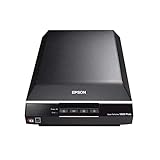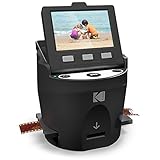
That box of slide carousels in the closet has been waiting for years, and mailing them off to a digitizing service costs more than most people expect. The KODAK Slide N Scan takes a different approach: a compact desktop unit with a built-in screen that photographs your film one frame at a time and writes JPEGs straight to an SD card.
You get a 22MP capture, a 5-inch LCD for previewing every frame before you commit, and no computer required during the actual scanning process. That last part separates it from cheaper units that force you to work blind.
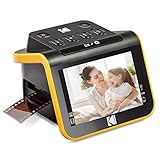
- SAVE OLD PHOTO MEMORIES: 1422MP Digital Film Scanner Lets You View, Edit and Convert Your Old Color and BandW Negatives 135, 110, 126mm and 50mm Slides 135, 110, 126mm to Digital Files and Save Directly to SD Card (NOT INCLUDED)
- 5” LCD DISPLAY WITH GALLERY MODE: Features Large, Crystal-Clear Screen with Wide Viewing Angle for Instantly Previewing and Editing Photos | Great for Sharing with Friends and Family or Using as an Elegant Digital Picture Frame in Home or Office
- CONVENIENT EASY-LOAD FILM INSERTS: Quick-Feeding Tray Technology Allows for Continuous Loading Action, Making Scanning Fast and Simple Includes 50mm Slide Holder, Adapters for 135, 110 and 126 Films, Cleaning Brush, USB and HDMI Cables

It handles 35mm, 110, and 126 negatives plus 50mm slides, weighs a pound, and sits at the top of Amazon’s slide and negative scanner category. For anyone with a few thousand frames to get through, speed and simplicity matter more than lab-grade resolution.
Bottom Line
If you have boxes of family negatives and slides you want digitized this year instead of someday, this scanner makes the job achievable in evenings on the couch. Check current availability on Amazon and start converting your film archive.
KODAK Slide N Scan Film & Slide Scanner Overview
Standing 3.74 inches tall and roughly 5.3 inches square, this unit takes up about the same desk space as a coffee mug and its saucer. At sixteen ounces, it stays put while you feed film through it.
A CMOS sensor sits behind the backlit film gate, capturing at 22 megapixels with 24-bit color depth. Power draw is 15 watts, while connectivity includes USB-C to a computer and HDMI out to a display.
Storage happens on an SD or SDHC card up to 32GB, which Kodak doesn’t include in the box. Buy one before the scanner arrives.
What does come included is the 50mm slide holder, three negative adapters, a cleaning brush, and both cables. Windows 7 is the minimum system requirement for computer transfer, though you can skip the computer entirely and pull the card when you’re done. Browse more options in our slide scanner reviews.
How Well Does 22MP Capture Old Film?
Expect files large enough for 8×10 prints and comfortably sharp for anything you’ll share digitally. The 22MP figure comes from interpolation applied to the sensor’s native capture, which is standard practice across this product class.
Technically, the device photographs your backlit frame instead of performing a traditional transport-based scan. Owners notice this distinction, and it explains the speed: a frame takes seconds, while a flatbed film scan can take minutes.
Faded slides and negatives with degraded emulsion still produce usable images. Color accuracy on badly deteriorated film drifts, though the built-in exposure and color adjustments recover a surprising amount.
Dust shows up clearly at this resolution, so use the cleaning brush on every frame. For a resolution comparison, see how the Magnasonic All-in-One 24MP Film Scanner handles the same task.
5-Inch LCD Preview and Gallery Mode
Seeing the frame before you capture it changes the whole workflow. The 5-inch panel shows a live view of whatever film sits in the gate, with a wide enough viewing angle that you don’t need to sit directly in front of it.
Adjustments happen on-screen: film type selection, brightness, color balance, and date stamping. You dial in the look, press scan, and move on.
Gallery mode plays back everything on the card, turning the unit into a small digital frame when it’s not scanning. That’s a reasonable use for the device between projects.
Connect the HDMI cable and your captures appear on a TV, which works well for showing relatives what you’ve recovered from the family archive.
Fast Film Loading and One-Touch Editing
The quick-feed tray design lets you push one frame in as the previous one exits, so you never have to stop and reload. Strips of 35mm negatives run through continuously once you get into a rhythm.
Slides load into a dedicated holder that drops into the same gate. Switching between formats takes only a few seconds.
A single scan button handles capture, enhancement, and file writing. There aren’t any nested menus to navigate during a session.
One quirk worth knowing: the film type setting resets instead of persisting between power cycles, so you’ll need to reselect it each time you sit down. Owners flag this as the main friction point in an otherwise smooth process. Our KODAK Digital Film Scanner review covers a related model in the lineup.
Supported Slide and Negative Formats
Four film formats are covered through the included adapters, handling the vast majority of consumer film shot from the 1950s onward.
| Format | Type | Adapter Included |
|---|---|---|
| 135 (35mm) | Color & B&W negatives, slides | Yes |
| 110 | Color & B&W negatives, slides | Yes |
| 126 | Color & B&W negatives, slides | Yes |
| 50mm | Mounted slides | Slide holder included |
Ektachrome, Kodachrome, and standard color negative stock all run through without special settings beyond selecting the correct film type on-screen.
Medium format film falls outside what this unit accepts. If your collection includes 120 or 220 rolls, you’ll need a different solution for those. Compare the field in our best slide scanner roundup.
Pros and Cons
Pros
- Works without a computer, writing JPEGs directly to SD card
- 5-inch screen makes framing and color correction visible before capture
- Continuous-feed tray moves through negative strips quickly
- Covers 135, 110, 126, and 50mm slides with included adapters
- HDMI output for viewing scans on a TV
- Compact enough to leave on a desk between sessions
- Recovers usable images from heavily faded film
Cons
- Film type setting resets and requires reselection each session
- SD card sold separately, capped at 32GB
- Interpolated 22MP won’t match a dedicated flatbed film scanner
- No support for medium format film
- Dust on negatives shows clearly and requires cleaning every frame
What Customer Reviews Reveal
Speed dominates the feedback from owners who’ve completed large projects. One customer digitized over 2,000 images for a holiday gift after being disappointed by a competing product.
Ease of use draws consistent praise, though several people mention watching a YouTube walkthrough after finding the printed instructions thin. Once you’re past setup, the learning curve flattens quickly.
The repeated criticism is that film type selection doesn’t stick between sessions. Owners also describe the device as taking a screen capture of the backlit frame, and most consider that tradeoff worthwhile given how much faster it is than a true scan.
International buyers report similar satisfaction, with Spanish-language reviewers noting good results recovering 60-year-old slides across different sizes. Reviews across the slide scanner category show similar patterns for this product class.
Conclusion
For anyone facing a physical backlog of family film, this scanner solves the problem that matters: getting through the volume. Frames take seconds, the screen shows you what you’re getting, and the SD card fills up without a computer tethered to your desk.
Professional archivists digitizing irreplaceable originals should look at dedicated film scanners with higher optical resolution and infrared dust removal. Everyone else, meaning people with shoeboxes of vacation slides and childhood negatives, will find the output more than adequate for prints, social sharing, and digital frames.
Buy a 32GB SD card and a can of compressed air alongside it, set aside a few evenings, and plan to work in batches of 100 or so frames.
Frequently Asked Questions
Is the KODAK Slide N Scan easy to use for beginners?
Yes, the workflow reduces to loading film, checking the screen, and pressing one button. The included documentation is brief, so plan on watching a short video walkthrough for initial setup. After that, most people scan comfortably within ten minutes.
What film and slide formats can the KODAK Slide N Scan digitize?
It accepts 135 (35mm), 110, and 126 negatives in both color and black and white, plus 50mm mounted slides. Adapters for each format ship in the box, and switching between them takes only a few seconds.
Does the KODAK Slide N Scan include an SD card?
No, you supply your own SD or SDHC card, and the device supports capacities up to 32GB. A 32GB card holds several thousand scans at full resolution, which covers most family archive projects without swapping.
Are the scans good enough for sharing and printing?
Files at 22MP print well up to 8×10 and look sharp on any screen. Original film condition drives quality more than the scanner itself, and heavily faded slides produce visible color shifts even with on-screen correction applied.
Can the KODAK Slide N Scan connect to a computer or TV?
Yes, USB-C connects it to any compatible computer for file transfer, and the included HDMI cable outputs to a television. Windows 7 is the stated minimum for computer connection, though the SD card route works with any device that reads cards.
What is the difference between the KODAK Slide N Scan 5 and 7?
The number refers to screen size in inches, with the 7-inch model offering a larger preview display. Scanning resolution and supported film formats stay the same between them, so the choice really comes down to how much screen space you want while working.
TechBytes

Our mission is to showcase the complex world of technology with comprehensive, accessible reviews. We bring you the freshest insights on everything from the most streamlined smartphones to the mightiest laptops, as well as the latest in smart home gadgets that simplify your daily routine and fitness wearables that monitor your well-being. Rest assured, we're here to guide you through the ever-evolving tech landscape.