
Shopping for a budget wireless setup usually means choosing between decent typing feel and reliable connectivity. The NPET S21 keyboard and mouse combo tries to give you both, pairing a full-size 104-key board with a rechargeable battery and a 3200 DPI gaming mouse that share one nano receiver.
If you want backlighting, a cable-free desk, and a full number pad without spending mechanical-keyboard money, the S21 covers those bases. Its 2.4GHz wireless performance does depend heavily on where you place the receiver, though.
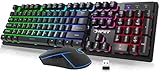
- Rechargeable Wireless Gaming Keyboard. The keyboard's built-in 1600mAh battery eliminates the trouble of frequently changing batteries. Please charge 4 hours before using
- 2.4G Wireless Transmission Keyboard. Up to 10m wireless working distance, conveniently designed for gaming or office or home use. Metal and ABS construction make it more solid and reliable
- Colorful Illuminated Keyboard. 4 LED lighting backlit modes, breathing(7-color alternate). 3 Adjustable permanent mixed backlit modes, changeable breathing or permanent lighting mode

The keyboard runs on a built-in 1600mAh lithium-ion cell, uses a metal-and-ABS top plate, and offers four RGB backlight modes. The mouse steps through four DPI presets and stores the receiver in its underside compartment.
Bottom Line
The S21 makes sense if you want a tidy, illuminated desk on a modest budget and can position the USB receiver away from monitor interference.
Check current availability and details for the NPET S21 combo on Amazon.
Overview: NPET S21 Wireless Gaming Keyboard and Mouse Combo
Two devices, one dongle, no cables at your desk. That’s the core pitch here, and the S21 delivers it in a black, ambidextrous package built around a standard QWERTY layout with all 104 keys intact.
The keyboard uses membrane switches tuned for a mechanical feeling response. Travel is quieter than true mechanical switches while still offering raised, well-separated keycaps. The metal backplate adds rigidity and weight, which keeps the board from sliding during fast key presses.
Pricing sits firmly in entry-level territory, and the feature list reflects that. You get RGB lighting and a rechargeable battery, but there are no programmable macros, onboard profiles, or companion software. For a look at what higher-tier options add, our roundup of the best mechanical keyboards covers the gap.
Rechargeable Wireless Setup
Charging replaces battery swaps entirely. The 1600mAh cell lives inside the keyboard, and NPET recommends a full four-hour charge before your first session. That’s worth doing since units ship partially depleted.
Real-world runtime stretches across multiple days of regular use with the backlight cycling. Turning the lighting off extends that considerably, since the LEDs draw more power than the wireless radio does.
You can keep working while it charges. The USB cable feeds power without converting the connection to wired data, so the 2.4GHz link stays active throughout.
How Does the Single Nano Receiver Work?
One receiver handles both peripherals, and it ships tucked into a compartment on the bottom of the mouse. Pull it out before assuming the box is missing parts, since that placement catches plenty of buyers off guard.
Plug it into a free USB-A port and Windows recognizes both devices without drivers. There’s no pairing button or software step, which keeps setup to under a minute.
RGB Backlighting and Keyboard Feel
Lighting runs in four modes: a seven-color breathing cycle plus three fixed mixed-color layouts. You toggle between them with a function shortcut, and the board remembers your selection after it powers down.
Keycap legends are cut through so the light passes cleanly, making the board readable in a dark room. Brightness peaks lower than on premium RGB boards, so bright daylight washes out the effect somewhat.
Typing feel lands between a standard office membrane and a true mechanical switch. Keys sit high with clear separation, actuation is soft, and the sound stays quiet enough for shared rooms. Anyone wanting real switch feedback should compare it against the Razer BlackWidow V4 75%.
Are the Lighting Modes Useful for Everyday Use?
The three static modes are the practical ones for work. Fixed color zones give you constant key visibility without the pulsing distraction of the breathing cycle, which suits late-night sessions better.
Per-key customization isn’t on offer here. You pick from the preset patterns, and that’s the full extent of the control.
3200 DPI Mouse Performance
Four DPI presets cover 800, 1600, 2400, and 3200, cycled through a button behind the scroll wheel. Tracking at 1600 DPI feels accurate on a cloth pad for both shooters and desktop work.
The 3200 ceiling suits 1080p and 1440p displays comfortably. Anyone running a 4K panel across dual monitors will want higher sensitivity than this sensor provides.
Button count stays basic: left, right, wheel click, DPI toggle, and two thumb buttons. Click response is firm with a definite tactile break, while the scroll wheel steps in clear notches.
Is the Mouse Comfortable for Long Sessions?
The symmetrical shell favors a claw grip and works for either hand. Its low, streamlined profile keeps your wrist relatively flat, which reduces strain across a two-hour session.
Palm-grip users with large hands will find it undersized. The body sits shorter than a full-size ergonomic mouse, so your fingertips extend past the front edge.
Windows Compatibility and Desk Setup
Windows machines from XP forward run this combo without setup steps, including Windows 10 and Windows 11. Plug in the receiver, wait a few seconds, and both devices report as standard HID hardware.
macOS support isn’t part of the design. Keys register on a Mac, but the function-row layout and lighting shortcuts follow Windows conventions.
Placement of the receiver has a bigger effect on performance than any other setup choice. A front-panel USB port or a hub positioned below your display outperforms a rear-panel port hidden behind a metal case and monitor stand.
Who Will Benefit Most From the 10-Meter Claimed Range?
Living-room PC users get the most out of it. Ten meters covers a couch-to-TV distance easily, and buyers report solid performance at roughly ten feet from the tower.
Desk users never approach that limit, so the range spec matters less than line of sight. Metal obstructions between the receiver and your hands cost you more signal than distance does.
Pros and Cons
Pros
- Rechargeable 1600mAh battery holds a charge across several days of use
- Full 104-key layout keeps the number pad and both CTRL and ALT keys
- Single nano receiver covers keyboard and mouse on one USB port
- Metal backplate gives the board weight and resists flex
- Quiet key travel suits shared offices and late-night sessions
- Four DPI steps from 800 to 3200 handle most 1080p and 1440p setups
Cons
- Mouse lag reported when the receiver sits behind a monitor or case
- Occasional split-second dropouts on both devices for some buyers
- Backlight brightness fades in bright daylight
- Lighting limited to four preset modes with no per-key control
- Mouse shell runs small for palm-grip users
- A handful of reports of hardware failure within the first days
Customer Reviews and Reliability Feedback
Feedback splits cleanly along one line: the keyboard earns consistent praise while the mouse draws the complaints. Buyers highlight the complete key layout, the raised key profile, and multi-day battery life between charges.
One reviewer who works in Emacs specifically valued having every modifier key present, which many compact boards drop. Others report smooth gaming across roughly ten feet from the tower.
Reliability reports are mixed. A small number of buyers experienced total failure within days, with one describing a keyboard that stopped charging entirely. That pattern is worth weighing against the price point when comparing the S21 to alternatives in our wireless keyboard and mouse coverage.
What Do Verified Buyers Say About Wireless Lag?
Mouse lag comes up more than any other issue, and one buyer traced the cause directly. Their Samsung monitor blocked the signal; relocating the receiver to a hub below the display eliminated the lag completely.
Another reported persistent lag regardless of proximity to the dongle, suggesting unit variation. A third saw both devices cut out for a second or two intermittently even after reinstalling drivers.
Conclusion
Buy the S21 if you want a full-size illuminated wireless board at an entry-level price and have a front-facing USB port or hub available. The keyboard side is the stronger half of this package, delivering quiet raised keys, real battery endurance, and a rigid metal-backed chassis.
Skip it if you play competitive shooters where a two-second dropout costs you a round, or if you use a palm grip and need a larger mouse body. Interference reports cluster around receivers placed behind monitors and metal cases, so plan that placement before your first session.
For a wired alternative from the same brand at similar money, the NPET K10 removes the wireless variable entirely.
Frequently Asked Questions
Is the NPET S21 keyboard and mouse combo good for gaming?
It handles casual and mid-tier gaming well, with quick key response and DPI steps up to 3200 that suit 1080p and 1440p play. Competitive shooter players should be aware that some units show wireless lag or brief dropouts, which matters more in ranked matches than in single-player titles.
Does the NPET S21 use one USB receiver for both devices?
Yes, a single nano receiver connects both the keyboard and the mouse over 2.4GHz. The dongle ships inside a compartment on the underside of the mouse, so check there before assuming it was left out of the box.
How long does the NPET S21 keyboard battery last?
The 1600mAh cell runs for several days of regular use with the backlight active, and considerably longer with lighting turned off. Give it a full four-hour charge before first use, and note that you can keep typing while it charges.
Can the NPET S21 work with Windows 10 and Windows 11?
Both versions run it without any driver installation. Plug the receiver into a USB-A port and the system recognizes the keyboard and mouse as standard HID devices within a few seconds.
Why might the NPET S21 mouse experience lag or disconnections?
Signal interference from monitors, metal PC cases, and nearby 2.4GHz devices is the most common cause. Moving the receiver to a USB hub positioned in front of or below your display resolves the problem for most users.
Still, a small number report that the lag persists, regardless of where the dongle is placed.
TechBytes

Our mission is to showcase the complex world of technology with comprehensive, accessible reviews. We bring you the freshest insights on everything from the most streamlined smartphones to the mightiest laptops, as well as the latest in smart home gadgets that simplify your daily routine and fitness wearables that monitor your well-being. Rest assured, we're here to guide you through the ever-evolving tech landscape.
