
Cable organization is a hassle for anyone juggling a bunch of devices at home or at work. The Anker 525 steps in to tame the chaos, letting you manage several gadgets from one compact hub.
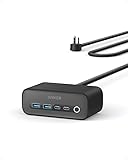
- Smarter Charging Safety: ActiveShield 2.0 provides temperature regulation and adaptive power control to help safeguard your device.
- Organized Charging Setup: Back-positioned AC outlets minimize cable clutter, with front-facing ports for easy access, making the Anker 525 Charging Station a tidy power solution.
- Simultaneous High-Speed Charging: Charge 4 devices at once with dual USB-C and USB-A ports for fast, efficient 65W power delivery.

AC outlets are tucked away at the back, cutting down on visible mess, while the charging ports are right up front for easy access. People mention the solid build and quick charging—definitely strong points—but yeah, it’s not invisible on your desk.
Some folks like that it charges several devices at once without getting hot. The layout and power output work well if you’re someone who needs to plug in a mix of gadgets all the time.
Overview: Anker 525 Charging Station
A lot of users say the Anker 525 is a practical solution for desk or home office setups, thanks to its compact shape and cable management options. Seven ports—both AC and USB (A and C)—give you flexibility for all sorts of gear.
Its safety features are a highlight. Real-time temperature checks and adaptive power management offer some peace of mind.
People like the sturdy feel and efficient charging speeds. On the flip side, if you need more than three AC outlets, this isn’t the one.
Pros:
- Charges most small office setups at once
- Tames cable clutter
- Advanced safety features
Cons:
- Only three AC outlets, so not for everyone
- Best for users with lots of USB-powered devices
ActiveShield 2.0 Safety System
Safety is a real concern when you’re powering a bunch of devices. The ActiveShield 2.0 system is all about keeping tabs on temperature and power in real time, which helps avoid overheating.
Users have noticed it stays cool during charging, so the safety system seems to do its job. Its adaptive power is handy if you’re charging a weird mix of gadgets.
That said, the extra protection might be why it’s bulkier than basic strips. If desk space is tight, that’s something to consider.
Organized Charging Setup
Tangled cords and charging multiple devices can make any workspace look messy fast. The 525 Station helps by putting AC outlets on the back, keeping cable clutter out of sight.
Front-facing USB ports make it easy to plug in and grab your phone or other gadgets. Its size is small enough for a desk or nightstand.
Having both AC and USB ports in one spot is a win for keeping things tidy. If you’re using several chunky adapters, though, space can get tight.
Pros:
- Keeps cords more organized
- Makes charging multiple devices easier
Cons:
- Not much room for big chargers
- Only three AC outlets to work with
Simultaneous High-Speed Charging
It’s tough to juggle lots of devices, especially if fast charging matters to you. The Anker 525 lets you charge up to four devices—laptops, phones, tablets—at once, and it doesn’t really slow down the speed for most things.
If you plug in a bunch of high-powered stuff, charging might slow a bit compared to just one device. Still, being able to power several devices at once is a big plus for most setups.
Multi-Device Powering Capability
For most people, charging several gadgets at once is just a fact of life. The Anker 525 lets you connect up to seven devices, thanks to the mix of USB and AC outlets.
You can charge laptops, phones, and accessories without swapping plugs all the time. People like having both USB-A and USB-C ports, but those big adapters can make it tricky to use every AC outlet at once.
Warranty and Customer Support
You get a 24-month warranty with the 525 Charging Station, which is decent protection against defects. There’s also a connected equipment warranty for extra peace of mind if something goes wrong.
Most users say customer service is quick and helpful, especially with warranty stuff. A few have hit bumps with response times, though.
Anker’s coverage is pretty standard, but your experience with support might vary. If after-sales service matters to you, it’s worth keeping in mind.
Space-Saving Design
A crowded desk can get out of hand fast. The Anker 525 keeps things tight by rolling a bunch of charging ports and AC outlets into one unit, so you don’t need a pile of adapters.
Its footprint is small, so it works for tight spaces or anyone who likes a neat home office. Having everything in one spot cuts down on cable mess, though plugging in a ton of devices at once can make it feel a little cramped.
Pros and Cons
Some features jump out right away if you’re looking to streamline your desk setup.
Pros
- Multiple Charging Options:
The 7-in-1 design lets you power a bunch of devices at once, which is handy for busy homes or workspaces. - High-Speed USB-C Charging:
Dual USB-C ports mean fast charging, even for laptops—great if you’ve got newer gear. - Efficient Layout:
AC outlets in the back keep cords in check, and USB ports up front are easy to reach. - Safety Features:
Real-time temperature monitoring and adaptive power management add a safety net. - Sturdy Build:
People mention the solid construction and long-term durability.
| Feature | Benefit |
|---|---|
| 7-in-1 Hub | Multiple devices charged at once |
| ActiveShield 2.0 | Enhanced safety |
| Compact Design | Fits on desks and behind furniture easily |
Cons
- Limited AC Outlets:
Only three AC outlets, so if you’ve got lots of non-USB stuff, you might run out of space. - Bulkier Than Basic Power Strips:
It’s compact, but not as slim as a basic power bar—especially when everything’s plugged in. - Not Ideal for Travel:
Better for a desk or home setup than tossing in a travel bag. - 65W Power Delivery Split:
The 65W output gets divided between devices, so charging can slow down for high-watt gadgets.
These are the main upsides and tradeoffs to think about before deciding.
Customer Reviews
A lot of users highlight the steady performance and how it helps cut cable clutter. Rapid charging for phones and laptops gets mentioned often, and the station doesn’t seem to overheat.
People praise the solid build. The flat, angled plug and the layout get nods for fitting into awkward spots.
Key themes from user feedback:
- Reliable charging for multiple devices
- Solid build quality
- Reduces the need for multiple adapters
- Some wish for even more unique features
Frequently Asked Questions
How many devices can the Anker 525 Charging Station simultaneously support?
You can power up to seven compatible devices at once—three AC outlets, two USB-A, and two USB-C. That’s pretty good for anyone wanting to cut clutter and keep a bunch of electronics plugged in.
The AC outlets are close together, though, so big plugs might not fit side by side.
What is the maximum output per port for the Anker 525 Charging Station?
The total output tops out at 65W, which is split among all ports. USB-C ports give the most juice, so they’re best for laptops and tablets.
Plug in lots of high-demand devices and charging speeds will dip, since power is shared. For everyday phones and a laptop, it’s usually enough.
Is the Anker 525 Charging Station compatible with all USB-C devices?
It works with most mainstream USB-C devices, including phones and laptops. Charging speed and compatibility can vary, though, depending on your device’s needs.
Very high-powered laptops or specialty devices might charge slower, or not at full speed. It’s worth double-checking your device’s requirements.
Does the Anker 525 Charging Station come with a warranty, and if so, what are the terms?
Anker gives you a 24-month warranty on the 525 Charging Station. There’s also a lifetime connected equipment warranty (up to $200,000) for devices damaged while properly connected.
Support and warranty service are usually straightforward. For the latest info, it’s best to check Anker’s site or the included paperwork.
Can the Anker 525 Charging Station charge a laptop efficiently?
The two USB-C ports can handle many laptops, and people say it works well for MacBooks and similar models.
If you’ve got a big, power-hungry laptop, it might charge slower or not keep up during heavy use. For ultrabooks and tablets, it’s generally fine.
Are any cables included with the purchase of the Anker 525 Charging Station?
You get the charging station itself and a built-in 5-foot extension cord. No extra USB or USB-C cables are included.
If you want to use all the ports, you’ll need your own cables for each device.
Conclusion
Having tested the Anker 525 Charging Station extensively, we’ve come to appreciate its flexibility and performance. This device has become a central part of our charging routine with a multitude of ports that cater to various devices—phones, laptops, and tablets. Combining both USB-A and USB-C ports along with traditional AC outlets, it adeptly handles multiple devices simultaneously without any dip in charging speed.
While the rigidity of its power cord might seem a minor quibble, it doesn’t detract from the overall utility that the station provides. At the core, it’s the convenience that stands out—no more need for multiple charging blocks, just one efficient station resting neatly wherever you need it.
Our experience speaks to the 525’s reliability and the ease it brings to a tech-filled environment. Whether it’s propped behind a couch for easy access or tucked into a travel bag, it proves to be a smart buy for anyone looking to declutter and streamline their power needs. Its integration into our daily lives is seamless, affirming its well-deserved high praise.
TechBytes
Our mission is to showcase the complex world of technology with comprehensive, accessible reviews. We bring you the freshest insights on everything from the most streamlined smartphones to the mightiest laptops, as well as the latest in smart home gadgets that simplify your daily routine and fitness wearables that monitor your well-being. Rest assured, we're here to guide you through the ever-evolving tech landscape.
