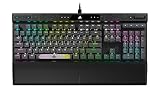
Razer BlackWidow V4 75% Review: Custom Gaming, Real Caveats

Compact mechanical keyboards with hot-swap sockets used to mean ordering a barebones kit and sourcing your own parts. The Razer BlackWidow V4 75% puts that flexibility into a finished, retail-ready board with an aluminum top case, gasket mounting, and Chroma lighting on every key.

This Razer BlackWidow V4 75% review covers what the board does well out of the box and the switch reliability complaints that show up repeatedly in long-term owner feedback.

Sale
Razer BlackWidow V4 75% Mechanical Gaming Keyboard, Orange Switches, Black | Hot-Swappable Design, Compact & Durable, Chroma RGB, MF Roller & Media Keys, Comfortable Wrist Rest
  • HOT-SWAPPABLE DESIGN — Compatible with 3 or 5-pin switches, the keyboard’s socketed PCB allows an easy swap out of its pre-loaded switches for custom ones to achieve desired key feel
  • COMPACT 75% LAYOUT WITH ALUMNIUM CASE — Ideal for setups where desk space is a premium, the keyboard features a durable build and covers esential commands
  • OPTIMIZED TYPING EXPERIENCE — Enjoy light, balanced keystrokes that sound full and satisfying with a gasket-mounted FR4 plate, tape-enhanced PCB, lubricated stabilizers, and two layers of sound-dampening foam

Razer BlackWidow V4 75% Mechanical Gaming Keyboard

You get 87 keys in a 75% arrangement, a magnetic leatherette wrist rest, a multi-function roller for volume and brightness, and a keycap/switch puller in the box. Razer’s Orange tactile switches come pre-installed, and the socketed PCB accepts 3-pin or 5-pin replacements.

Bottom Line

If you want a compact board with strong typing acoustics and the freedom to change switches later, this one earns a look, provided you accept that some units develop double-typing and plan on swapping switches as part of ownership.

Check current availability and pricing on Amazon

Overview: Razer BlackWidow V4 75% Mechanical Gaming Keyboard

Think of this as Razer’s answer to the enthusiast custom scene, sold assembled. The 75% layout keeps function keys and arrows while dropping the numpad, measuring 12.64 by 6.12 inches and weighing roughly 3.4 pounds.

Specification Detail
Layout 75%, 87 keys, QWERTY
Switches Razer Orange tactile, hot-swappable (3/5-pin)
Plate FR4, gasket-mounted
Case 5052 aluminum alloy and ABS plastic
Connection Wired USB-C to USB-A, braided
Lighting Per-key Chroma RGB plus 2-side underglow
Warranty 2-year manufacturer

Compatibility spans Windows, Linux, and Android. Razer Synapse 4 handles remapping, macros, and the Snap Tap input priority feature, which ships disabled.

Hot-Swappable Switch Sockets for Custom Key Feel

Socketed switches are the headline feature, and they work as advertised. Pull a keycap with the included 2-in-1 tool, lift the switch, and drop in any 3-pin or 5-pin mechanical switch without soldering.

That matters more here than on most boards, because the stock Orange tactiles draw the sharpest criticism in owner feedback. Swapping to Gateron, Cherry, or aftermarket linears is a 20-minute job across the whole board.

Keep the socket pins straight during installation. Bent pins are the usual cause of a dead key after a swap, and they’re the first thing to check before assuming a hardware fault. Builders coming from the wider world of mechanical keyboards will find the process familiar.

Gasket-Mounted Typing Feel and Aluminum Build

Acoustics are where this board consistently impresses. A gasket-mounted FR4 plate, tape-modded PCB, factory-lubricated stabilizers, and dual sound-dampening foam layers combine into a muted, low-pitched sound signature that’s closer to a custom build than a typical gaming keyboard.

The 5052 aluminum top case adds rigidity and heft, so the board stays planted during fast key presses. Flex is minimal, while the gasket mount softens bottom-out impact without making the typing feel mushy.

Stock Orange switches are tactile with a light actuation force. Owners who build their own boards describe them as quieter than Razer’s usual output, though the tactile bump is subtle. Anyone comparing options across the best mechanical keyboards will notice that the sound tuning is unusually good for a retail unit.

Chroma RGB, Media Controls, and Magnetic Wrist Rest

Lighting runs deeper than per-key backlighting alone. Two-sided underglow strips wash the desk surface, and Chroma integration covers hundreds of titles that sync effects to in-game events.

The multi-function roller sits top-right alongside dedicated media keys. Its default behavior is volume, but Synapse lets you reassign it to brightness, zoom, or application-specific controls.

A plush leatherette wrist rest snaps on magnetically and stays aligned during use. It adds meaningful support for long sessions, and detaching it takes a second when you want the smaller footprint back. If desk ergonomics are a priority, pairing it with ergonomic peripherals makes a noticeable difference over multi-hour stretches.

Who Is This 75% Keyboard Best For?

Tinkerers get the most value here. If you plan to change switches, tune the sound further, or experiment with keycap sets, the socketed PCB and solid chassis give you a strong starting point without soldering equipment.

Competitive players benefit from Snap Tap, which prioritizes the most recent input between two bound keys for counter-strafing. It stays off until you enable it in Synapse.

Desk space matters for the 75% crowd, and this layout preserves arrows and F-keys that 65% boards drop. Data entry work suffers without a numpad, and one owner noted the board suits gaming far better than routine office tasks. Shoppers wanting an untethered setup should look at a wireless gaming keyboard and mouse combo instead.

Pros and Cons

Pros

  • Genuine hot-swap sockets accept 3-pin and 5-pin switches with no soldering
  • Gasket mount, FR4 plate, tape mod, and dual foam deliver custom-board acoustics
  • 5052 aluminum construction feels rigid and adds welcome weight
  • Per-key Chroma plus two-sided underglow with broad game integration
  • Multi-function roller and dedicated media keys are reassignable in Synapse
  • Magnetic leatherette wrist rest attaches securely and comes included
  • Two-year manufacturer warranty

Cons

  • Repeated owner reports of keys double-typing after weeks or months of use
  • Stock Orange switches are the weakest part of the package for many buyers
  • Occasional dead keys out of the box, including non-registering modifiers
  • Wired only, with no Bluetooth or 2.4 GHz option
  • No numpad, which limits spreadsheet and accounting work
  • Full customization requires Razer Synapse running in the background

What Customer Reviews Reveal

Owner sentiment splits sharply between build quality praise and switch durability complaints. The board is well-rated by buyers who value acoustics and modding potential, while the average score is dragged down by a recurring hardware pattern.

What Owners Like Most

Sound quality dominates the positive feedback. Custom keyboard builders call it their favorite stock board, citing the muted typing profile and the fact that Razer’s factory tuning needs little improvement.

Build feel earns similar praise. Reviewers who don’t consider themselves enthusiasts describe a clear step up in quality over previous Razer boards, and international buyers highlight the gaming experience as worth the outlay.

Reported Reliability Concerns

Double-typing is the dominant complaint, and it appears across multiple independent reviews. Owners describe keys registering twice after a few weeks to a few months, with one buyer receiving a replacement unit that developed the identical fault.

A separate cluster reports keys failing on arrival, including a left Shift that never registered even after the switch was moved to a different socket. Several owners resolved the problem permanently by replacing the Orange switches with third-party alternatives, which the hot-swap design makes straightforward.

Conclusion

Buy this board if switch swapping is part of your plan rather than an emergency repair. The chassis, gasket mount, foam stack, and stabilizer tuning are the parts you cannot easily change, and Razer executed all of them well.

The Orange switches are the parts you can change, and enough owners have needed to that budgeting for a replacement set is reasonable. A full set of 87 aftermarket switches runs a fraction of the keyboard’s cost.

Register the purchase for the two-year warranty and test every key during the return window, paying particular attention to modifiers and any key you use heavily. For a broader look at competing layouts and switch types, browse the site’s mechanical keyboard coverage before committing.

Frequently Asked Questions

Is the Razer BlackWidow V4 75% good for gaming?

Yes, the layout, light tactile switches, and Snap Tap input priority suit fast-paced competitive play. Snap Tap prioritizes your most recent keypress between two assigned keys, which helps with counter-strafing in shooters, and it must be enabled manually in Razer Synapse 4.

Can you replace the switches on the Razer BlackWidow V4 75%?

Yes, the PCB is socketed and accepts both 3-pin and 5-pin mechanical switches with no soldering required. A 2-in-1 keycap and switch puller ships in the box, and swapping the full 87-key set takes roughly 20 minutes.

Does the Razer BlackWidow V4 75% work with PS5?

Razer lists compatibility for Windows, Linux, and Android, not PlayStation. Basic typing may function on a console through the USB-C connection, though Synapse features including Chroma effects, macros, and Snap Tap will not be available.

Is the Razer BlackWidow V4 75% wireless?

No, this is a wired keyboard using a detachable braided USB-A to USB-C cable. Razer sells wireless models in other lines, but this particular board has no Bluetooth or 2.4 GHz dongle option.

Does the Razer BlackWidow V4 75% have double-typing issues?

Multiple owners report keys registering twice after several weeks to a few months of use. It’s the most common complaint about this model. Because the sockets are hot-swappable, replacing the affected switch, or even the full set with third-party switches, resolves the problem without soldering.

Our mission is to showcase the complex world of technology with comprehensive, accessible reviews. We bring you the freshest insights on everything from the most streamlined smartphones to the mightiest laptops, as well as the latest in smart home gadgets that simplify your daily routine and fitness wearables that monitor your well-being. Rest assured, we're here to guide you through the ever-evolving tech landscape.

Best Mechanical Keyboards 2024

Mechanical keyboards have become a popular choice for typists, gamers, and professionals alike. These keyboards are known for their durability, tactile feedback, and customizable features, distinguishing them significantly from their membrane counterparts. Offering an enhanced typing experience, mechanical keyboards cater to various needs, whether it’s for heavy typing or fast-paced gaming.

When choosing the best mechanical keyboard, paying attention to key features is essential. These include the type of switches used, as they significantly affect the typing feel and sound. Other factors include durability, key rollover, and build quality. It’s also crucial to consider personal preferences such as backlighting options and programmability.

We evaluated several mechanical keyboards on the market to help you find the perfect model for your needs.

Best Mechanical Keyboards

We have compiled a list of the top mechanical keyboards available today. Each of these keyboards excels in performance, durability, and design.

Cooler Master MK770 Macaron Keyboard

Cooler Master MK770 Macaron Wireless Mechanical RGB Gaming Keyboard, Kailh Box V2 Linear Red Switches, Gasket Structure, Hot-Swappable, Bluetooth|2.4GHz, Tactile 3-Way Dial, QWERTY (MK-770-MCKR1-US)
  • 98 Key Layout: The MK770 caters to user preference by keeping the Numpad while streamlining the function area. Its reduced length conserves desk space while preserving most regular keyboard functions.
  • Hot-Swappable Kailh Box V2 Switches: Enhanced by their durability and reinforced stems, these keyboards deliver a consistent typing experience and can be easily customized to suit your preferences.
  • Hybrid Wireless Technology: Experience versatile connectivity options with wired Type-C or wireless functionality. Choose from 2.4GHz for lag-free input or Bluetooth 5.1 for convenient and flexible connectivity.

Perfect for those who love a blend of functionality with unique aesthetics.

Pros

  • Smooth, factory-lubricated Kailh Box V2 switches
  • Compact 95% layout saves desk space
  • Hybrid wireless options allow flexibility

Cons

  • Inconsistent backlighting on some rows
  • Limited custom lighting options in software
  • Bluetooth connectivity issues

We found the Cooler Master MK770 Macaron Keyboard to be a refreshing blend of performance and design. The Kailh Box V2 switches provided an exceptionally smooth typing experience, and the hot-swappable design made customization a breeze. It’s a visually striking keyboard that adds a playful touch to any workspace.

The compact layout is both space-saving and practical, retaining essential keys like the Numpad. Hybrid wireless technology gives us the flexibility to switch between wired, 2.4GHz, and Bluetooth modes effortlessly, which is perfect for multitaskers.

On the downside, the backlighting isn’t as consistent, and Cooler Master’s software leaves us wanting more customization options. We also encountered Bluetooth connectivity issues, which affected overall reliability. Despite these drawbacks, it’s a solid choice for anyone looking to upgrade their keyboard setup.

LEMOKEY X1 Keyboard

LEMOKEY X1 Wired Mechanical Keyboard, QMK Programmable TKL Layout with Pre-Lubed Linear Switch, North-Facing Red Backlit NKRO Compatible with Windows
  • Wired TKL Mechanical Gaming Keyboard: Experience the Lemokey X1, a highly accessible wired mechanical keyboard with a classic tenkeyless layout. This keyboard is fully programmable on every key, allowing you to customize it for gaming or work. It features vibrant red backlighting with 14+ red lighting effects, adding a stylish touch to your setup.
  • Program with QMK & VIA: You can easily program and remap each key on the keyboard. The open-source firmware means endless possibilities for keyboard layouts, shortcuts, backlight effects, and more. Once it's done, the keymap will work on wired mode and even be saved with onboard memory.
  • Shine-Through Keycaps & Red Backlit: Made through the ABS double-shot process, the keycaps are durable and wear-resistant. With all black keycap option. Meanwhile, the shine-through letters lit up by the north-facing LED present a glamorous look at your fingertips. Shine-through keycaps combined with a side-light design are ideal for late-night work or gaming sessions.

The LEMOKEY X1 Keyboard offers customizable features and solid build quality, making it an excellent choice for gamers and professionals.

Pros

  • Smooth, responsive key switches
  • Customizable key mapping with QMK firmware
  • Durable, attractive backlit design

Cons

  • Fixed key switches, not swappable
  • Potentially noisy during use
  • Initial software setup can be confusing

The LEMOKEY X1 impresses with its smooth, pre-lubed linear switches that provide a responsive and enjoyable typing experience. The keyboard’s build quality feels sturdy and well-made, making it a reliable choice for both gaming and professional tasks.

Customization is a key feature, enhanced by the Lemokey web app that allows us to easily remap keys to suit our needs. The vibrant red backlight adds a stylish touch, ideal for late-night sessions.

Despite its strengths, the keyboard has some minor drawbacks, such as its fixed key switches and somewhat noisy operation. Initial setup with the software might be a bit challenging for first-time users. Overall, the LEMOKEY X1 offers great value with its mix of performance and customization options.

Keychron V6 Mechanical Keyboard

Sale
Keychron V6 Wired Custom Mechanical Keyboard, Full-Size QMK/VIA Programmable Macro with Hot-swappable Keychron K Pro Red Switch Compatible with Mac Windows Linux (Frosted Black-Translucent)
  • 108 Keys Mechanical Keyboard: The V6 is a full-sized custom mechanical keyboard with QMK/VIA support, which can offer you endless possibilities of customization and meet your needs in different situations. With double-shot PBT keycaps, an acoustic silicone pad, screw-in stabs, and pre-lubed switches, etc. It will meet your diverse needs and bring you excellent typing comfort!
  • Fully Customizable From the Inside Out: To build a fully customizable keyboard, we designed every component easily assembled, including keycaps, switches, gasket, plate, and case foam if you want. With QMK and VIA support, you can easily program and remap each key on the keyboard. The open-source firmware means endless possibilities for keyboard layouts, shortcuts, backlight effects, and more.
  • Hot-swappable Support: With the pre-lubed mechanical linear red switch provides unrivaled tactile responsiveness with up to 50 million keystroke lifespan. You can also hot-swap the V6 with almost all of the 3pin and 5pin MX mechanical switches on the market (including Cherry, Gateron, Kailh, Panda, etc.) without soldering required. The PCB-mounted screw-in stabilizer for “big keys” such as space bar, shift, enter, and delete are designed for less wobbliness and smooth performance.

The Keychron V6 offers a combination of solid build quality and extensive customization options and is a worthy buy for mechanical keyboard enthusiasts.

Pros

  • Robust build with excellent typing comfort
  • Extensive customization possibilities with QMK/VIA support
  • Hot-swappable switches for easy personalization

Cons

  • South-facing backlighting may not be effective with opaque keycaps
  • Lack of additional accessories in the box
  • Slightly heavier than other models

The Keychron V6 provides an exceptional typing experience thanks to its pre-lubed red switches. These switches require less force to press, making them ideal for long typing sessions. The keyboard’s solid build adds a satisfying heft, which reduces any potential wobbling on the desk.

Customization is a significant highlight with the V6. With QMK and VIA support, users can reprogram and remap keys to fit their preferences. The hot-swappable capability sets it apart, allowing us to swap out switches without any soldering, easily adjusting the keyboard’s tactile feel.

One of the few downsides we noticed is the south-facing backlighting. While it sounds promising, it doesn’t shine as brightly through opaque keycaps, which might diminish its appeal for those who love vibrant RGB effects. Also, while the keyboard’s package includes essential tools, other promised accessories were missing. Despite these minor flaws, the Keychron V6 stands out as a top-tier choice for those who value customization and build quality.

Razer BlackWidow V4 75% Mechanical Gaming Keyboard

Sale
Razer BlackWidow V4 75% Mechanical Gaming Keyboard, Orange Switches, Black | Hot-Swappable Design, Compact & Durable, Chroma RGB, MF Roller & Media Keys, Comfortable Wrist Rest
  • HOT-SWAPPABLE DESIGN — Compatible with 3 or 5-pin switches, the keyboard’s socketed PCB allows an easy swap out of its pre-loaded switches for custom ones to achieve desired key feel
  • COMPACT 75% LAYOUT WITH ALUMNIUM CASE — Ideal for setups where desk space is a premium, the keyboard features a durable build and covers esential commands
  • OPTIMIZED TYPING EXPERIENCE — Enjoy light, balanced keystrokes that sound full and satisfying with a gasket-mounted FR4 plate, tape-enhanced PCB, lubricated stabilizers, and two layers of sound-dampening foam

For those craving customization and immersion, this keyboard is a go-to choice.

Pros

  • Hot-swappable switches for easy customization
  • Compact layout saves desk space
  • Stunning RGB and underglow lighting

Cons

  • Tactile switches may not be to everyone’s taste
  • Some users reported double-typing issues
  • Slightly expensive for its feature set

The Razer BlackWidow V4 75% offers a compact, hot-swappable design that makes it easy to customize your key feel. The aluminum case is sturdy and fits well into tight desk spaces, making it ideal for those with limited room. We found the per-key RGB lighting and the two-sided underglow particularly striking, adding a great visual touch to any gaming setup.

Typing on this keyboard feels satisfying with light, balanced keystrokes. The added features like the magnetically attached plush leatherette wrist rest provide comfort during long gaming sessions. The multi-function roller and media keys also add convenience, allowing you to control brightness and volume without leaving your game.

Some users have reported issues like double-typing after a few weeks of use, which can be frustrating. The tactile switches might not appeal to everyone, especially those who prefer a smoother keystroke. Additionally, it’s priced on the higher side for what it offers, but the customization and build quality might make it worth the investment for serious gamers.

CORSAIR K70 MAX

CORSAIR K70 MAX RGB Magnetic Mechanical Wired Gaming Keyboard – MGX Adjustable Switches, Simultaneous SOCD and Rapid Trigger, PBT Double-Shot Keycaps, Sound Dampening, 8000Hz Polling, QWERTY NA, Black
  • Adjustable Magnetic-Mechanical Switches: The entire keyboard is equipped with fully adjustable CORSAIR MGX switches, enabling you to set every key’s actuation point from a light 0.4mm to a strong 3.6mm in 0.1mm steps, putting you in control for fast keypresses or ultra-accurate typing.
  • Two Actions for One Keypress: Dual-point actuation lets you assign two discrete actions to one keypress, giving you the ability to execute instant one-two combos.
  • CORSAIR AXON Hyper-Processing Technology: AXON enables premier K70 performance, processing and transmitting inputs up to 8x faster than conventional gaming keyboards with 8,000Hz hyper-polling. 8,000Hz hyper-polling is dependent on CPU; older CPUs may experience reduced performance.

The CORSAIR K70 MAX is a fantastic choice for gamers seeking a highly customizable and responsive keyboard.

Pros

  • Superb build quality
  • Customizable actuation points
  • Soft, satisfying typing acoustics

Cons

  • Premium price point
  • May be too complex for casual users
  • Compatibility issues with older CPUs

The CORSAIR K70 MAX impressed us right out of the box with its robust aluminum frame and luxurious palm rest. The keyboard feels substantial and well-constructed, giving it a premium look and feel. We particularly appreciated the plush memory foam in the palm rest, which added a significant comfort factor during long gaming sessions.

One of the standout features is the adjustable actuation points. Being able to set each key’s actuation from 0.4mm to 3.6mm lets us fine-tune the keyboard to our specific needs, whether for rapid gaming actions or precise typing tasks. This level of customization is unparalleled and makes the experience uniquely ours.

While the heightened customization is fantastic, it does come with a learning curve. The advanced settings may be daunting for those not familiar with mechanical keyboards. Additionally, we encountered some compatibility issues with older CPUs, impacting the AXON Hyper-Processing Technology’s performance. Despite these minor setbacks, the K70 MAX is an exceptional keyboard for those serious about gaming and customization.

NuPhy Air75 V2 Mechanical Keyboard

nuphy Air75 V2 Portable 75% Mechanical Keyboard,Wireless Keyboard,Supports Bluetooth/2.4G/USB-C RGB Gaming Keyboards,Compatible with Windows/Mac OS/Linux Systems Grey-Gateron Brown Switch
  • Translucent bottom shell design: The overall layout of the Air75 V2 wireless keyboard is similar to that of the Air75, featuring a high-quality aluminum frame. However, we have adopted a new translucent design on the bottom case of the keyboard, which makes the internal structure of the Air75v2 clearly visible and fully utilizes the overall aesthetics of the keyboard. At the same time, we've added two height stands to the bottom of the keyboard to make it even more comfortable to use.
  • Supports multi-device connectivity: Air75 V2 wireless mechanical keyboard is compatible with Mac/Windows/Linux/Android/iOS,and supports Bluetooth 5.1 connectivity, 2.4g connectivity and wired connectivity modes, which allows you to connect up to 4 computer devices at the same time and switch between these computers to use them, which can satisfy a wide range of entertainment office needs
  • Cool RGB Backlit Effect: The backlight of Air75 V2 has more than 21 different color effects, which can be easily changed using key combination. Through console, you can even limitlessly customize lighting effects(the keycaps are not backlit).We also added two RGB light bars on each side of the Air75 V2's aluminum frame. The left bar shows caps lock and connection mode, while the right bar shows battery level and system mode, so you can see the status of your keyboard more visually.

The NuPhy Air75 V2 offers a premium typing experience with versatile connectivity options and a stylish design.

Pros

  • Sleek translucent bottom for an aesthetically pleasing look
  • Multi-device compatibility for seamless switching
  • Customizable RGB lighting for a personalized setup

Cons

  • Keycaps are not backlit
  • Some users may find the noise level a bit high
  • Wrist rest must be purchased separately

We found the NuPhy Air75 V2 to be a joy to use, with its sleek design adding a modern touch to our workspace. The translucent bottom shell is not just eye-catching but also allows us to appreciate the mechanical structure underneath. The inclusion of two height stands made our typing sessions more comfortable, reducing wrist strain.

Switching between devices was a breeze with this keyboard. Thanks to its support for multiple connectivity options—Bluetooth 5.1, 2.4GHz, and USB-C—we could easily connect it to our Windows PC, Mac, and even a Linux setup. This versatility makes it ideal for both work and play.

The customizable RGB lighting added a fun element to our use. With over 21 color effects and additional side RGB light bars, it was easy to match the keyboard’s look to our mood or workspace aesthetics. The customization options through QMK/VIA gave us the flexibility to set up the keyboard exactly the way we wanted.

The only minor downside was the lack of backlighting on the keycaps, which could be an issue in low-light environments. Additionally, the keyboard is slightly noisier than some might prefer, and we had to purchase a wrist rest separately. Despite these minor drawbacks, the NuPhy Air75 V2 offers an excellent balance of form and function, making it a standout choice for anyone in the market for a new mechanical keyboard.

Buying Guide

When considering a mechanical keyboard, there are several key factors to examine. These include switch type, build quality, key rollover, and additional features.

Switch Type

Switch type is crucial. Mechanical keyboards use various switches, each with distinct characteristics:

  • Linear: Smooth keystrokes without tactile feedback.
  • Tactile: Noticeable bump at the actuation point.
  • Clicky: Tactile bump and audible click.

Build Quality

Good build quality ensures durability. Look for the following:

  • Frame Material: Aluminum frames are robust; plastic frames can be lighter.
  • Keycap Material: PBT plastic keycaps are more durable than ABS plastic.

Key Rollover and Anti-Ghosting

Key rollover and anti-ghosting are important for gamers and fast typists:

  • N-Key Rollover (NKRO): Allows multiple keys to register simultaneously.
  • Anti-Ghosting: Ensures all keys pressed are registered correctly.

Additional Features

Consider additional features to enhance the user experience:

  • Backlighting: Single-color or RGB lighting can be useful in low light.
  • Programmable Keys: Customizable keys for specific functions or macros.
  • Connectivity Options: Wired for consistent performance; wireless for flexibility.

Table of Common Features

Feature Description
Switch Type Linear, Tactile, Clicky
Frame Material Aluminum, Plastic
Keycap Material PBT, ABS
Key Rollover NKRO
Anti-Ghosting Ensures all keys register
Backlighting Single-color, RGB
Programmable Keys Customizable functions
Connectivity Options Wired, Wireless

By focusing on these factors, we can make an informed decision when selecting the best mechanical keyboard for our needs.

Frequently Asked Questions

We address some of the most common questions about mechanical keyboards, providing insights into options for gaming, professional typing, preferred brands, and budget-friendly choices.

What is considered the best mechanical keyboard for gaming?

The Corsair K95 RGB Platinum often ranks highly for its responsive Cherry MX switches. Razer BlackWidow Elite is another top contender known for its customizable RGB lighting and dedicated macros.

Which mechanical keyboards are preferred for professional typing?

The Das Keyboard 4 Professional stands out for its durable construction and tactile Cherry MX Blue switches. Keychron K2 is also a favorite for its compact design and Gateron switches, ideal for typing long hours.

What are the top brands for mechanical keyboards to look out for?

We recommend Corsair, Razer, Logitech, Das Keyboard, and Keychron. These brands consistently offer high-quality, reliable mechanical keyboards suitable for various needs and preferences.

How does mechanical keyboard performance vary between wired and wireless options?

Wired keyboards generally offer lower latency, making them ideal for gaming. Wireless variants like the Logitech G915 TKL provide flexibility and a cleaner setup without significant performance loss for most tasks.

What are the best budget-friendly mechanical keyboards available?

For those on a budget, the Redragon K552 delivers excellent performance and build quality. Tecware Phantom is another affordable option that does not skimp on features, offering hot-swappable switches and RGB lighting.

Which mechanical keyboards are highly recommended for programmers?

Programmers often favor the Varmilo VA87M for its customizable key layouts and solid build quality. The Drop CTRL offers hot-swappable switches and a compact design, making it another excellent choice for coding environments.

Click to access the login or register cheese