
Backing up a laptop full of photos, project files, and years of accumulated clutter usually comes down to one question: how much storage can you carry in a jacket pocket? The WD 5TB My Passport Ultra answers that with a metal-clad 2.5-inch mechanical drive that weighs under five ounces and slips into a bag without much notice.
This WD My Passport Ultra 5TB review focuses on what the drive does well for bulk storage: massive capacity per dollar, bus power over a single cable, and built-in 256-bit AES hardware encryption for anyone storing sensitive files.
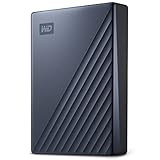
- USB-C and USB 3.1 compatible
- Innovative style with refined metal cover
- Password protection with 256-bit AES hardware encryption

The blue anodized finish, USB-C connector, and included backup software round out a package aimed at Windows users who want plug-and-play storage without a separate power brick. It ranks among the top sellers in external hard drives, and the average customer rating remains comfortably high across tens of thousands of buyers.
Bottom Line
For archiving media libraries, running scheduled backups, or moving large project folders between machines, this drive delivers more terabytes per dollar than any portable SSD in its class.
Check current availability and pricing on Amazon.
WD My Passport Ultra 5TB Overview
At its core, this is a 2.5-inch mechanical hard disk wrapped in a metal enclosure measuring roughly 4.33 by 3.21 inches and just 0.83 inches thick. Weight comes in around 4.64 ounces, light enough to toss into a laptop sleeve.
Western Digital ships it formatted for Windows with a USB-C connection and a USB 3.0 adapter cable in the box, along with a quick start guide. Backup software with ransomware defense and the WD Security utility handle scheduling and encryption setup.
A three-year limited warranty covers the unit. If you want a broader look at how it compares with other options, our best external hard drive roundup covers the field.
Portable 5TB Capacity for Backups and Media
Five terabytes in a bus-powered portable drive is where mechanical storage still beats flash on cost. That capacity holds roughly a thousand hours of 1080p video, an entire ripped CD collection, or a decade of photo libraries with room to spare.
Buyers frequently use it as a Time Machine target on macOS or a scheduled Windows backup destination. Others treat it as a media vault for network streaming, leaving the drive connected to a desktop and serving files across the house.
The 2.5-inch platter design means slower random access than solid-state alternatives. For sequential writes of large files, though, throughput stays consistent enough that transferring hundreds of gigabytes becomes a set-it-and-walk-away task. Compare the tradeoffs in our Seagate Portable 5TB external hard drive review.
USB-C Connectivity and Windows-Ready Setup
Plugging in and seeing the drive mount within seconds is the typical first experience, since it arrives preformatted with a Windows-compatible file system. There’s no driver installation or partitioning step.
The drive uses a USB-C port on the enclosure and supports USB 3.1 speeds, with a USB-A adapter cable included so older laptops and desktops still connect. That flexibility means one drive can serve a modern MacBook and a five-year-old Windows tower.
Bus power comes entirely through the data cable. Anyone building out a multi-device desk setup may find our coverage of USB-C accessories useful for hub and dock compatibility.
Password Protection With 256-Bit AES Hardware Encryption
Encryption runs on the drive controller rather than your CPU, so enabling a password through the WD Security utility costs nothing in transfer performance. Lock the drive, and its contents stay unreadable without the password on any machine you connect it to.
This suits anyone hauling client files, tax records, or medical documents between locations. The bundled backup software also includes ransomware defense, adding another layer for scheduled backup sets.
One caution applies: WD cannot recover a forgotten password, and a locked drive requires a full erase to reuse. Store the credential somewhere reliable. Our guide to protecting valuable data with reliable storage solutions covers complementary practices.
Pros and Cons
Pros
- Exceptional capacity-per-dollar compared to portable SSDs at similar price points
- Compact metal enclosure at 4.64 ounces travels easily
- USB-C native with a USB-A adapter cable included
- Hardware-based 256-bit AES encryption with no performance penalty
- Bus-powered, so no wall adapter is required
- Three-year limited warranty from Western Digital
Cons
- Mechanical platters mean slower random access and greater shock sensitivity than flash storage
- Several buyers report the bundled cable fits loosely or fails prematurely
- Ships formatted for Windows, so Mac users must reformat for Time Machine
- Sequential transfer speeds trail even entry-level portable SSDs
What Customer Reviews Reveal
Feedback across tens of thousands of ratings clusters around two themes: the drive itself earns steady praise for reliability, while the included cable draws repeated complaints.
Reliability and Everyday Backup Feedback
Long-term owners describe running the drive for months without data loss, reformatting, or mounting errors. Several note that it’s their latest in a series of My Passport purchases, both personal and for clients, with each generation improving incrementally.
One reviewer credited the drive with rescuing a terabyte of data after a laptop failure. Mac users report it working smoothly with Time Machine once reformatted, and a European buyer praised the aluminum build for shuttling large files between a USB-C desktop and a USB 3.0 MacBook Air. Similar sentiment appears in our Western Digital My Passport review.
Included Cable and Setup Concerns
The most consistent complaint targets the bundled USB cable, which some buyers found mis-toleranced enough to seat poorly or disconnect during transfers. Swapping in a quality third-party cable resolves the issue, and retractable USB cables are one convenient replacement option.
Setup itself draws few objections. Windows users report immediate plug-and-play recognition, while Mac owners simply run Disk Utility to reformat before their first backup.
Conclusion
Choose this drive when your priority is storing a lot of data cheaply in something you can carry. Five terabytes of bus-powered capacity in a 4.64-ounce metal shell covers photo archives, video libraries, and full-system backups without a power outlet nearby.
Skip it if you edit video directly off external storage or need drop resistance, since a mechanical drive delivers neither. A flash-based option like the SanDisk 1TB Extreme Portable SSD suits that workload better at a much higher cost per terabyte.
Budget for a replacement USB-C cable alongside your order, and set up the password through WD Security before you copy anything sensitive onto it.
View the WD 5TB My Passport Ultra on Amazon.
Frequently Asked Questions
Is the WD My Passport Ultra 5TB worth buying?
Yes, for bulk backup and media archiving where capacity per dollar drives the decision. The value proposition weakens if you need fast random access or plan to work directly from the drive, since a mechanical disk handles those tasks slowly.
Does the WD My Passport Ultra 5TB work with Mac computers?
It works with macOS after reformatting through Disk Utility, and Mac owners report using it successfully as a Time Machine destination. The drive ships formatted for Windows, so that reformat is a required first step before any Mac backup runs.
How fast is the WD My Passport Ultra 5TB for file transfers?
Real-world sequential transfer speeds land in the range expected from a 2.5-inch USB 3.1 mechanical drive, adequate for moving large files in the background. Random reads and small-file operations run noticeably slower than any SSD, which becomes obvious when browsing a large photo library.
Does the WD My Passport Ultra 5TB need an external power adapter?
No, the drive draws all its power through the USB connection. A single cable handles both data and power, which is why owners use it with laptops in the field without carrying a wall adapter.
What is the difference between WD My Passport and My Passport Ultra?
The Ultra line uses a metal enclosure and a native USB-C port, while the standard My Passport has a plastic shell with a Micro-B connector. Both offer 256-bit AES hardware encryption and comparable capacities, so the choice really comes down to build material and connector preference.
TechBytes

Our mission is to showcase the complex world of technology with comprehensive, accessible reviews. We bring you the freshest insights on everything from the most streamlined smartphones to the mightiest laptops, as well as the latest in smart home gadgets that simplify your daily routine and fitness wearables that monitor your well-being. Rest assured, we're here to guide you through the ever-evolving tech landscape.
