
Shopping for a mesh system that can keep up with a gigabit or multi-gig fiber plan usually means choosing between coverage and raw throughput. The TP-Link Deco 7 Pro BE63 tries to sidestep that tradeoff with tri-band Wi-Fi 7, four 2.5G ports, and a footprint small enough to sit on a bookshelf without drawing attention.
Sold as a single unit here, it works as a standalone router or an add-on node to an existing Deco network. That flexibility is a big part of the appeal for anyone building out coverage in stages.
- 𝐅𝐞𝐚𝐭𝐮𝐫𝐞-𝐑𝐢𝐜𝐡 𝐖𝐢-𝐅𝐢 𝐁𝐮𝐢𝐥𝐭 𝐭𝐨 𝐋𝐚𝐬𝐭: Get expansive whole-home coverage, fast Wi-Fi 7 speeds, and a future-ready 10G WAN/LAN port that stays ahead as your network grows. Ideal for both everyday users and performance-focused homeowners.
- 𝗩𝗮𝘀𝘁 𝗠𝗲𝘀𝗵 𝗖𝗼𝘃𝗲𝗿𝗮𝗴𝗲 & 𝗗𝗲𝘃𝗶𝗰𝗲 𝗖𝗮𝗽𝗮𝗰𝗶𝘁𝘆: The mesh router covers up to a vast 3,000 sq.ft. and supports over 200 devices without compromising performance, ensuring seamless connectivity.
- 𝐁𝐄𝟏𝟎𝟎𝟎𝟎 𝐓𝐫𝐢-𝐁𝐚𝐧𝐝 𝐖𝐢-𝐅𝐢 𝟕 𝐒𝐩𝐞𝐞𝐝𝐬: Delivers up to 5,188 Mbps (6 GHz), 4,324 Mbps (5 GHz), and 574 Mbps (2.4 GHz) speeds for 4K/8K streaming, AR/VR gaming, and more. Performance varies by conditions, distance to devices, & obstacles such as walls.


This TP-Link Deco 7 Pro BE63 review found the strongest case for it in homes with fiber service and a heavy device count, where the 6 GHz band and 2.5G wired ports both get used.
Bottom Line
If you want Wi-Fi 7 speeds with room to expand the mesh later, the Deco BE63 delivers on both counts without demanding a networking background to set up.
Check current availability and pricing for the TP-Link Deco 7 Pro BE63 on Amazon.
TP-Link Deco 7 Pro BE63 Tri-Band WiFi 7 BE10000 Whole Home Mesh System Overview
The BE63 is a tri-band 802.11be unit rated at a combined 10 Gbps, split across 5,188 Mbps on 6 GHz, 4,324 Mbps on 5 GHz, and 574 Mbps on 2.4 GHz.
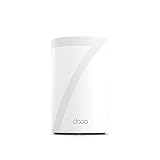
Physically, it’s a white cylinder roughly 4.2 inches square at the base and just under 7 inches tall, weighing 1.7 pounds. Four internal antennas keep the exterior clean.
The box includes the unit, a power adapter, an Ethernet cable, and a quick start guide. TP-Link backs it with a two-year warranty.
| Spec | Detail |
|---|---|
| Wi-Fi generation | Wi-Fi 7 (802.11be), tri-band |
| Rated coverage | Up to 3,000 sq. ft. per unit |
| Wired ports | Four 2.5G WAN/LAN, one USB 3.0 |
| Device capacity | 200+ |
| Security | WPA3, WPA2-PSK, WPA-PSK |
Backward compatibility reaches down through 802.11ac, ax, n, and g, so older laptops and smart plugs still connect.
Wi-Fi 7 Speed for Streaming, Gaming, and Fiber
The 6 GHz band is where this system earns its rating, handing modern phones and laptops a clean, wide channel that older 5 GHz-only gear can’t crowd.
Pairing it with a fiber plan makes the most sense. Reviewers running fiber report that throughput at the client closely tracks what their provider sells them, which is what you want from a router that isn’t the bottleneck.
For gaming, the appeal is latency stability more than peak numbers. Wi-Fi 7 gaming routers use MLO and wider channels to cut jitter, and the BE63 carries the same underlying radio capability.
Real speeds vary with wall construction, distance, and how many neighbors share your spectrum.
Whole-Home Coverage and 200-Device Capacity
One BE63 unit is rated for 3,000 square feet, and in practice that figure describes an open floor plan more than a multi-story house with plaster walls.
Owners of small to mid-size single-family homes report solid single-unit coverage. At least one buyer expected more reach than they got, which lines up with how rated coverage figures behave once floors and dense walls enter the picture.
The 200-device ceiling is the more dependable number. Smart bulbs, cameras, thermostats, and TVs all hold connections without the slowdowns that plague older hardware, which is why Wi-Fi 7 mesh systems suit dense smart home setups.
AI-Roaming hands devices between nodes under one network name as you move around.
Four 2.5G Ports and Flexible Wired Backhaul
Four 2.5 Gbps WAN/LAN ports on a single mesh node is generous, and it’s a real differentiator against competitors that give you one WAN and one LAN.
Any of the four can serve as the WAN, leaving three for a NAS, a game console, or a desktop that deserves a wire. A USB 3.0 port handles a shared drive.
Wired and wireless backhaul run at the same time when you add a second unit, balancing traffic between nodes. If running cable through your walls isn’t practical, powerline Ethernet works as a Wi-Fi alternative for reaching a distant node.
The multi-gig ports also mean the hardware stays relevant if your ISP upgrades your plan.
Deco App Management and HomeShield Protection
Setup runs through the Deco app, and buyers consistently single it out as the easiest router configuration they’ve done, with most getting online in minutes.
The app covers guest networks, QoS, traffic monitoring, remote access, and firmware updates. Voice control works alongside app control for basic commands.
HomeShield adds parental controls, IoT device protection, and network scanning. Some features sit behind a subscription, which is worth checking before you count on a specific tool.
VPN client and server support is built in, so devices can reach a remote VPN without per-device software, while regular internet traffic runs alongside it.
Firmware updates deserve attention. One reviewer reported an update that disrupted their smart home devices, so reading release notes before applying is reasonable practice.
Pros and Cons
Pros
- Tri-band Wi-Fi 7 with a fast 6 GHz band that keeps up with fiber plans
- Four 2.5G WAN/LAN ports, more wired multi-gig capacity than most mesh nodes
- Setup through the Deco app is fast and requires no networking knowledge
- Handles 200+ connected devices for dense smart home use
- Works standalone or expands an existing Deco mesh network
- Compact white cylinder blends into a shelf; two-year warranty included
Cons
- Priced above mainstream mesh systems
- Real-world coverage falls short of the 3,000 sq. ft. rating in homes with dense walls
- Some HomeShield features require a paid subscription
- Firmware updates have caused smart home device issues for some owners
- Single-unit pack means a second node is a separate purchase
- Power adapter design has drawn complaints from international buyers
What Customer Reviews Reveal
Buyer feedback skews positive, with the strongest praise landing on setup simplicity and pairing with fiber service.
Several owners describe the app-guided installation as the smoothest they’ve experienced. One replaced a failed ISP-supplied router and found the Deco a straightforward drop-in. Another bought a second unit after being satisfied with the first, citing signal strength.
Coverage is the most common qualifier. One reviewer noted reach fell short of expectations while still rating speeds and setup well. Another found a single BE63 sufficient for a typical small to mid-size single-family home, which fits the pattern.
The sharpest criticism concerns a firmware release that broke smart home connectivity, paired with slow support response. That’s a minority report, though a relevant one if your home leans heavily on IoT devices.
International buyers have flagged the power adapter’s plug configuration.
Conclusion
The Deco BE63 fits homes with multi-gig or gigabit fiber and a device count that strains older hardware, where the 6 GHz band and four 2.5G ports both get exercised.
Buy a single unit if your home is under roughly 2,000 square feet of open layout, or if you’re extending an existing Deco network. Larger or awkwardly shaped homes should plan on two units from the start.
If you’d rather compare alternatives before committing, our Netgear Orbi 970 Wi-Fi 7 mesh review covers a higher-end option, and the TP-Link Archer BE550 router review looks at a standalone Wi-Fi 7 router from the same brand.
Check the TP-Link Deco 7 Pro BE63 on Amazon.
Frequently Asked Questions
Is the TP-Link Deco BE63 worth buying for a small or mid-size home?
Yes, particularly if you have fiber or gigabit service and want headroom for years of device growth. Owners of typical small to mid-size single-family homes report that one unit provides sufficient coverage without a second node.
Can one Deco BE63 unit cover a 3,000-square-foot home?
The 3,000 sq. ft. rating assumes favorable conditions, so an open floor plan gets closer to it than a multi-story house with dense walls. Buyers with larger or segmented layouts have found single-unit reach shorter than expected and should plan on two units.
Does the TP-Link Deco BE63 work with any internet provider?
Yes, it works with any ISP, and most connections require a separate modem. It also runs in access point mode if you need to keep your provider’s gateway in place.
How many 2.5G Ethernet ports does the Deco BE63 have?
Four 2.5 Gbps WAN/LAN ports, plus one USB 3.0 port. Any of the four Ethernet ports can serve as the WAN connection, leaving three available for wired devices like a NAS or desktop.
Can I add more Deco units to the TP-Link Deco BE63 later?
Yes, the single-pack BE63 can join an existing Deco mesh network, and you can add more Deco units later. Mixed Deco models work together under one network name, while wired and wireless backhaul are both available once you have at least two units.
TechBytes

Our mission is to showcase the complex world of technology with comprehensive, accessible reviews. We bring you the freshest insights on everything from the most streamlined smartphones to the mightiest laptops, as well as the latest in smart home gadgets that simplify your daily routine and fitness wearables that monitor your well-being. Rest assured, we're here to guide you through the ever-evolving tech landscape.
