
If your household runs on Wi-Fi and your current router keeps buckling under the load, the Synology WRX560 makes a strong case for itself. It pairs dual-band Wi-Fi 6 with a configurable 2.5GbE port and an operating system that behaves more like enterprise gear than a typical consumer box.
This Synology WRX560 router review looks at what you get for the money: wireless speeds up to 3 Gbps, support for roughly 150 connected devices, and a security stack that includes Threat Prevention, VLAN segmentation, and WPA3.
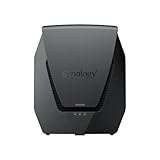
- Dual-band Wi-Fi 6 with 5.9 GHz support and configurable WAN/LAN 2.5GbE port enable fast wireless and wired transfers
- Comprehensive network security provided through Threat Prevention, VLAN segmentation, and WPA3 support
- Standalone router that can be incorporated into a mesh system for whole home coverage


The real draw here is Synology Router Manager, the software layer that turns a single router into a manageable network with guest isolation, per-device controls, and traffic visibility you rarely see at this price.
The hardware itself is compact at roughly 2.6 by 7.64 by 9.17 inches, uses internal antennas, weighs 2.8 pounds, and ships with a 2-year manufacturer warranty.
Bottom Line
If you want granular network control and real security features without stepping up to business gear, the WRX560 delivers. It suits homes with heavy streaming, remote work, and a pile of smart devices.
Check current availability and pricing for the Synology WRX560 on Amazon.
Synology WRX560 Overview for Busy Networks
Households with dozens of simultaneous connections are the target here. Synology rates this dual-band unit for up to 150 devices, which covers a typical mix of laptops, smart TVs, phones, cameras, and home automation gear without the network falling over.
The five-port layout includes a configurable WAN/LAN 2.5GbE port, giving you flexibility depending on whether your ISP hands you multi-gig service or you’d rather feed a NAS at 2.5 Gbps.
Physically, it stands upright in a white chassis with internal antennas, so it disappears on a shelf more easily than antenna-heavy competitors. If you already run a Synology NAS, the shared software philosophy will feel familiar. Browse more routers if you want to compare form factors.
Wi-Fi 6 Speed and 2.5GbE Connectivity
Combined wireless throughput tops out at 3 Gbps across the 2.4 GHz and 5 GHz bands, with support for the 5.9 GHz spectrum extension where regulations allow it. That extra channel space helps when neighboring networks crowd the standard 5 GHz range.
The 802.11ax implementation brings OFDMA and MU-MIMO, so airtime gets divided more efficiently among many small transmissions.
Wired performance is where the WRX560 separates itself from budget Wi-Fi 6 routers. One port runs at 2.5 Gbps and can serve as either WAN or LAN.
| Connectivity | Detail |
|---|---|
| Wireless standard | 802.11ax (Wi-Fi 6) |
| Bands | Dual-band, 5.9 GHz supported |
| Peak wireless rate | 3 Gbps combined |
| Ports | 5 total, one 2.5GbE configurable |
Threat Prevention, VLANs, and WPA3 Security
Security is the headline feature. Threat Prevention inspects traffic against an intrusion detection ruleset and blocks known malicious sources, a capability normally reserved for paid firewall appliances.
VLAN segmentation lets you wall off smart plugs, cameras, and guest devices from the machines holding your files. Owners consistently call this out as one of the strongest reasons to pick Synology over mainstream brands.
WPA3 encryption is supported alongside WPA2 for older clients, and multiple SSIDs can each map to a different VLAN. Built-in VPN server and client functions round out the package, letting you reach your home network remotely or route traffic outbound through a provider.
Mesh Coverage for Larger Homes
Coverage expands by adding a second Synology router as a mesh node, and the WRX560 works as either the primary unit or a satellite. That flexibility matters if you plan to grow into a two-story house or a detached office over time.
Mesh compatibility spans Synology’s current lineup, and older models like the Synology RT2600ac can participate, though owners report mixed results pairing generations. Matching hardware gives the most predictable handoff between nodes.
For homes with thick walls or long runs, wired backhaul to a second node produces far better results than wireless backhaul. If running Ethernet is impractical, powerline networking offers an alternative path.
Mobile Setup and Everyday Network Management
Initial configuration runs through the DS router app on iOS or Android, which walks you through connection type, SSID naming, and admin credentials in a few minutes. Most buyers describe getting online quickly, though a minority found the process less smooth than expected.
Day-to-day management is where Synology Router Manager earns its keep. The browser interface presents a desktop-style dashboard with real-time traffic graphs, per-device bandwidth history, and one-click quarantine for suspicious clients.
Parental controls tie to user profiles instead of single devices, so a child’s phone, tablet, and laptop share one schedule and filter list. Web filtering categories can be tuned per profile.
Pros and Cons
Weighing the WRX560 comes down to how much you value software depth against raw radio count. Here is how the tradeoffs break down.
Pros
- Synology Router Manager offers network controls well beyond typical consumer firmware
- Threat Prevention and VLAN segmentation provide real isolation for IoT gear
- Configurable 2.5GbE port serves multi-gig WAN or high-speed LAN duty
- Profile-based parental controls and web filtering
- Works standalone or as part of a Synology mesh network
- 2-year manufacturer warranty and steady firmware updates
Cons
- Dual-band only, so no dedicated tri-band backhaul channel
- Threat Prevention needs a USB drive or storage for full logging
- Mesh pairing with older Synology models has produced inconsistent results for some owners
- Feature depth means a learning curve for casual users
- Internal antennas limit the ability to aim coverage
Customer Reviews and Reported Ownership Experience
Feedback from buyers skews positive, with a well-rated average driven by praise for software capability and complaints centered on setup edge cases and mesh behavior.
What Owners Praise
Long-term owners report stable performance across months of use, including one who described roughly ten months of trouble-free operation. Households running multiple Windows PCs, half a dozen streaming TVs, and ten or more automation devices found the router kept pace.
Coverage improvements come up repeatedly. One owner with a largely wireless surveillance camera system found cameras that dropped out on a Netgear Nighthawk held solid connections after switching.
Buyers already familiar with Synology NAS products, such as the DS224+, reported the interface felt immediately familiar and the speed jump over their previous router was obvious.
Common Concerns From Owners
The most pointed criticism involves mesh expansion. One owner who purchased RT2600ac units specifically to act as repeaters found the arrangement unsatisfactory in practice.
A second complaint touches setup difficulty and intermittent Wi-Fi interruptions, along with frustration that certain feature limitations weren’t obvious before purchase. That same reviewer still rated the VLAN segmentation highly.
Conclusion
The WRX560 earns its place in homes where network control matters as much as throughput numbers. You get intrusion prevention, VLAN isolation for smart devices, WPA3, and a 2.5GbE port that adapts to whatever your ISP or NAS demands.
Buyers coming from basic ISP-supplied gear will notice the difference immediately in both speed and visibility. Those chasing maximum wireless bandwidth across three bands should look at tri-band alternatives instead.
For a busy household that wants segmented IoT traffic, enforceable screen-time rules, and firmware that keeps improving, this router fits. Check current reviews and grab it on Amazon.
Frequently Asked Questions
Is the Synology WRX560 good for a large home?
A single WRX560 covers most two- to three-bedroom homes well, but larger or multi-story properties benefit from adding a second unit as a mesh node. Internal antennas and dual-band radios mean thick walls or long distances will reduce throughput at the edges.
Does the Synology WRX560 support mesh Wi-Fi?
Yes, it functions as a standalone router or joins a Synology mesh network as either the main unit or a satellite. Pairing with matching hardware produces the most reliable roaming; some owners have reported inconsistent results mixing it with older Synology models.
How easy is Synology WRX560 setup?
Most buyers complete setup in under fifteen minutes using the DS router mobile app, which guides you through ISP connection type, network naming, and admin account creation. A minority found the process trickier than expected, particularly when migrating from an existing router with custom settings.
Does the Synology WRX560 have parental controls?
Yes, Synology Router Manager includes profile-based parental controls with web filtering, time scheduling, and per-user device grouping. Because rules attach to a person rather than a single device, a child’s phone and laptop follow the same schedule automatically.
Is the 2.5GbE port on the Synology WRX560 configurable?
Yes, the 2.5GbE port can be assigned as either WAN or LAN depending on your setup. Use it as WAN if your ISP delivers multi-gig service, or as LAN to give a NAS or workstation a high-speed wired link.
Can the Synology WRX560 handle many connected devices?
Synology rates the WRX560 for up to 150 concurrent connections, enough for even busy smart-home households. Owners running several streaming TVs, multiple computers, and a dozen or more automation devices report that the network stays responsive under load.
TechBytes

Our mission is to showcase the complex world of technology with comprehensive, accessible reviews. We bring you the freshest insights on everything from the most streamlined smartphones to the mightiest laptops, as well as the latest in smart home gadgets that simplify your daily routine and fitness wearables that monitor your well-being. Rest assured, we're here to guide you through the ever-evolving tech landscape.
