
Choosing between raw pixel density and raw speed used to mean owning two displays. The LG 32GS95UE puts both on one 31.5-inch OLED panel, running 4K at up to 240Hz for cinematic single-player games and dropping to 1080p at 480Hz when frame rate matters more.
That Dual Mode switch, paired with a 0.03ms GtG response time and a 1.5 million-to-one contrast ratio, is what separates this panel from the crowded field of 4K 144Hz gaming displays.
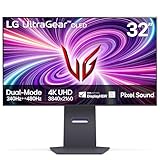
- 4K/UHD UltraGear OLED @ 240Hz - 4K UHD at up to 240Hz on an OLED display is the best of all gaming worlds - smooth, ultra-fast OLED gaming with immersive, breathtaking visuals.
- Dual Mode - LG UltraGear OLED introduces the World’s First VESA Certified Dual Mode gaming monitor, offering 4K up to 240Hz or Full HD up to 480Hz.
- 0.03ms Response Time - Enjoy smoother scenes with less lag or ghosting thanks to LG UltraGear OLED's nearly instantaneous 0.03ms (GtG) response time.

The matte anti-glare coating, DisplayHDR True Black 400 certification, and a two-year warranty that explicitly covers the OLED panel round out a package aimed at people who game seriously and work on the same screen.
Bottom Line
If you want one display that handles 4K cinematics and 480Hz shooters without compromise, the 32GS95UE delivers on both counts.
Check current availability and pricing for the LG 32GS95UE on Amazon.
Overview: LG 32GS95UE 32-Inch UltraGear OLED Gaming Monitor
A 31.5-inch 16:9 OLED panel at 3840×2160 gives this display a 0.18mm pixel pitch, sharp enough that text stays crisp without heavy scaling. The frame weighs 19.8 pounds and measures 28.1 inches wide by 24.6 inches tall with the stand.
| Specification | Detail |
|---|---|
| Panel | 31.5″ OLED, matte finish |
| Resolution | 3840 x 2160 (4K UHD) |
| Refresh rate | 240Hz at 4K / 480Hz at 1080p |
| Response time | 0.03ms GtG |
| Contrast | 1,500,000:1 |
| Brightness | 275 cd/m² |
| HDR | DisplayHDR True Black 400 |
| Power draw | 55W |
LG’s understated black chassis skips the aggressive angles common on gaming hardware, which matters if the monitor doubles as a work display.
Who Will Get the Most From This Monitor?
PC gamers running an RTX 40-series card or better will see the most return here, since DisplayPort 1.4 with DSC or HDMI 2.1 is required to hit 240Hz at 4K.
Anyone splitting time between competitive shooters and visually dense single-player titles benefits most from Dual Mode. Creative users get a wide color gamut and near-perfect blacks, though the 275-nit full-screen brightness suits controlled lighting better than a sun-facing office. Console owners cap out at 120Hz, so the 240Hz ceiling goes unused.
4K OLED Visuals With True Black Contrast
Per-pixel emissive lighting means black pixels switch off entirely, producing the 1.5 million-to-one contrast figure and eliminating the halo effect around bright objects that plagues edge-lit LCDs.
DisplayHDR True Black 400 certification targets exactly this behavior: shadow detail in dark scenes stays legible without gray wash. Color coverage sits at 98.5% of DCI-P3, translating to saturated reds and greens that hold up in HDR content.
Owners upgrading from 1440p IPS panels consistently describe the jump as substantial, particularly in dark games where subtle detail was previously crushed. If you’re weighing alternatives, our roundup of the best OLED gaming monitor options covers how this panel compares to smaller 27-inch QD-OLED designs.
Does the Matte Screen Finish Help in Bright Rooms?
The matte anti-glare coating diffuses reflections effectively, and buyers with overhead lighting or windows behind them report it as one of the deciding factors over glossy alternatives.
Diffusion comes with a tradeoff. Black levels take on a faint gray cast under strong ambient light, and some users notice slight texture on white backgrounds. In dim to moderately lit rooms, neither issue is especially noticeable.
Dual Mode for 4K 240Hz and Full HD 480Hz
This is the world’s first VESA-certified Dual Mode monitor, and the feature works by switching the panel driver rather than upscaling a lower resolution.
At 4K 240Hz you get full pixel density for open-world games and desktop work. Flip to 1080p 480Hz and the panel doubles its refresh ceiling, which suits Counter-Strike 2, Valorant, and Overwatch 2, where frame pacing beats sharpness.
Because 1080p is an exact quarter of 3840×2160, each source pixel maps cleanly to a 2×2 block. The image stays soft compared to native 4K but avoids the blur of non-integer scaling. Competitive players sitting closer to the panel tend to accept that trade readily.
How Easy Is It to Switch Between Resolutions and Refresh Rates?
Switching happens through the monitor’s on-screen joystick menu or a dedicated hotkey, with no need to change Windows display settings first.
The panel blanks for a few seconds during the handoff, then reconnects at the new mode. Windows remembers separate desktop layouts per resolution, so icons occasionally shuffle after a switch. LG’s OnScreen Control software can also trigger the change, though several owners have noted that the bundled utility installs alongside third-party antivirus prompts. That’s worth declining during setup.
0.03ms Response Time and Adaptive Sync Performance
OLED pixels transition in 0.03ms GtG, which effectively removes the smearing and inverse ghosting artifacts that require overdrive tuning on LCD panels.
There is no overdrive setting to configure here because the pixels are already faster than the refresh window at 480Hz. Fast camera pans stay clean, and dark trailing behind moving objects is absent.
Motion clarity still depends on sustained frame rate. At 480Hz with a frame rate hovering near 200fps, persistence blur returns, making adaptive sync essential to the experience.
G-SYNC Compatible and FreeSync Premium Pro Support
The panel carries official NVIDIA G-SYNC Compatible validation and AMD FreeSync Premium Pro certification, covering both GPU vendors without a hardware sync module.
G-SYNC works over DisplayPort on GTX 10-series and newer cards, and over HDMI 2.1 on RTX 30-series and newer. FreeSync Premium Pro adds low-latency HDR tone mapping for Radeon users. In practice, tearing disappears across the variable refresh window in both modes.
Pixel Sound and Everyday Setup Experience
Pixel Sound drives audio through exciters behind the OLED panel, so sound originates from the image itself instead of a downward-firing speaker bar. A woofer and DTS Virtual processing handle low end and spatial width.
Voices in dialogue-heavy games land where the character appears on screen, which is the noticeable benefit. Volume and bass depth don’t replace desktop speakers or a headset for serious listening.
One caveat: a small number of buyers have received the closely named 32GS95UV variant, which omits Pixel Sound. Confirm that the model number on the box reads 32GS95UE-B before setup.
Ports, Stand Adjustments, and Included Cables
Connectivity covers two HDMI 2.1 inputs, one DisplayPort 1.4, and three USB 3.0 ports for peripherals and firmware updates.
LG includes a DisplayPort cable, an HDMI 2.1 cable, a USB-A to B cable, and the power cord, so nothing extra is required on day one. The stand tilts, swivels, and adjusts for height, and the panel accepts a VESA wall mount if you prefer an arm.
Pros and Cons
Strong picture quality and genuine dual-mode flexibility define this monitor, with brightness and bundled software as the main friction points.
Pros
- 4K at 240Hz and 1080p at 480Hz on a single panel, switchable from the OSD
- Per-pixel OLED contrast with DisplayHDR True Black 400 certification
- 0.03ms GtG response eliminates ghosting without overdrive tuning
- Matte coating handles ambient light better than glossy QD-OLED panels
- Two-year warranty explicitly includes the OLED panel
- Restrained design that works on a desk alongside work applications
Cons
- 275 nits full-screen brightness limits use in sunlit rooms
- Pixel Sound audio is convenient but thin compared to dedicated speakers
- LG’s bundled Windows utility prompts third-party antivirus installation
- Consoles cap at 120Hz, leaving most of the refresh headroom unused
- 1080p mode looks noticeably soft at typical 32-inch viewing distance
- Isolated reports of panel failure within the first month of ownership
What Customer Reviews Reveal
Feedback across hundreds of buyers skews positive, with picture quality and the matte finish drawing the most praise and software behavior generating the most complaints.
What Buyers Like Most
Owners upgrading from 24-inch or 27-inch panels describe the size and clarity as transformative, particularly those coming from 60Hz displays. Several note that macOS at 4K 240Hz feels distinctly different from years spent at 4K 60Hz on a MacBook Pro.
Color reproduction and build quality come up repeatedly. Buyers who tested multiple OLED panels before settling report that this one had the coating they preferred. Setup and menu navigation are described as straightforward, though several recommend selecting the Gamer 1 preset and raising Peak Brightness to High rather than staying on the defaults.
Concerns Raised by Owners
The most consistent complaint involves LG’s software installing automatically on Windows and then surfacing McAfee antivirus prompts without a clear opt-in during setup.
A smaller number of buyers report panel defects, including one unit that failed within a month with slow support follow-up. At least one shipment arrived as the 32GS95UV model, which lacks the Pixel Sound system described in the listing. Console gamers have flagged that the 240Hz specification is unreachable on current hardware.
Conclusion
The 32GS95UE earns its place for anyone who refuses to choose between resolution and refresh rate, provided the GPU can feed it. A card capable of driving 4K at high frame rates makes the 240Hz mode worthwhile, and the 480Hz mode gives competitive players a legitimate reason to keep the same display for ranked play.
Brightness is the honest limitation. At 275 nits full-screen, the panel wants controlled lighting, and the matte coating handles what remains. Buyers in sun-filled rooms should look at brighter IPS alternatives like the BenQ PD3225U 32-inch 4K panel or browse other OLED monitors before committing.
Verify the model number reads 32GS95UE-B on arrival, decline the bundled software prompts during first setup, and register the unit to activate the two-year panel warranty.
Frequently Asked Questions
Is the LG 32GS95UE worth buying for competitive gaming?
Yes, the 480Hz Full HD mode paired with 0.03ms pixel response makes it viable for esports titles. Competitive players should note the 1080p image looks soft at 32 inches, so the benefit is motion clarity over visual detail.
Can the LG 32GS95UE run 4K at 240Hz?
Yes, at 3840×2160 the panel reaches 240Hz over DisplayPort 1.4 with DSC or HDMI 2.1. You need a graphics card supporting one of those standards, and sustaining 240fps in demanding titles requires a high-end GPU.
What is Dual Mode on the LG 32GS95UE?
Dual Mode lets you toggle the panel between 4K at 240Hz and Full HD at 480Hz directly from the monitor’s on-screen menu. It is the first VESA-certified implementation of this feature, and the switch takes a few seconds without touching Windows display settings.
Does the LG 32GS95UE work well with consoles?
It works well for PS5 and Xbox Series X at 4K 120Hz over HDMI 2.1, with VRR support. Current consoles cannot output above 120Hz, so the 240Hz and 480Hz modes go unused on console hardware.
Does the LG 32GS95UE have built-in speakers?
It uses Pixel Sound, which vibrates the OLED panel to produce audio along with a woofer and DTS Virtual processing. Sound quality suits dialogue and casual use; the closely named 32GS95UV variant does not include this system.
Is the LG 32GS95UE firmware updateable?
Yes, firmware updates install through the USB connection using LG’s OnScreen Control software on Windows. Keeping the firmware current can address adaptive sync behavior and Dual Mode stability. The utility also prompts you to install optional third-party software, which you can decline.
TechBytes

Our mission is to showcase the complex world of technology with comprehensive, accessible reviews. We bring you the freshest insights on everything from the most streamlined smartphones to the mightiest laptops, as well as the latest in smart home gadgets that simplify your daily routine and fitness wearables that monitor your well-being. Rest assured, we're here to guide you through the ever-evolving tech landscape.
