
Upgrading an aging desktop usually comes down to one question: where does your money buy the most noticeable improvement? If your system still runs DDR4, doubling capacity is often the answer, and the G.SKILL Ripjaws V 32GB kit sits in the sweet spot for that kind of upgrade.
This kit pairs two 16GB modules rated at DDR4-2666 with CL15-15-15-35 timings at 1.20V, wrapped in a low-profile red heat spreader that clears most air coolers. For anyone running a Skylake-era through 10th-gen Intel board or a budget AM4 build, a 32GB dual-channel kit at 2666MT/s removes the memory ceiling without demanding a new platform.
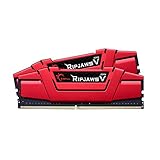
- Requires overclocking/BIOS adjustments. Maximum speed and performance depends on system components, including motherboard and CPU.
- G.SKILL RipjawsV Series DDR4 U-DIMM Memory Kit, Model: F4-2666C15D-32GVR
- Non-ECC, DDR4 U-DIMM, 288-pin, for Desktop PC & Gaming

It carries a JEDEC default profile alongside an Intel XMP 2.0 profile, so it will post at stock settings and then hit its rated speed with one BIOS toggle. A limited lifetime warranty backs the pair.
Bottom Line
If you want a straightforward capacity jump on a DDR4 desktop without chasing extreme frequencies, this Ripjaws V kit does the job quietly and reliably.
Check current availability for the G.SKILL Ripjaws V 32GB DDR4 kit on Amazon.
G.SKILL Ripjaws V 32GB DDR4 RAM Overview
Model F4-2666C15D-32GVR is a matched two-module set totaling 32GB, built on 288-pin non-ECC U-DIMMs for desktop boards. Each stick weighs in light, and the aluminum heat spreader stays under the height of most tower coolers.
The red finish is the visual signature here, with no RGB lighting and no software to install. Rated operation is 2666MT/s at CL15-15-15-35 on 1.20V, which is modest voltage for DDR4 and helps keep thermals unremarkable.
It ranks near the top of Amazon’s Computer Memory category and remains well-rated years after launch, which says something about how many older builds still take DDR4. Broader context on the format is available in our best DDR4 RAM roundup.
32GB Dual-Channel Capacity for Smoother Multitasking
Two 16GB modules populate two slots and leave the other two open on a four-slot board, which is the cleanest way to reach 32GB. Dual-channel operation is automatic once you seat them in the correct matched slots, listed in your motherboard manual as A2 and B2 on most Intel and AMD boards.
Capacity is what changes daily behavior. Dozens of browser tabs, a virtual machine, Photoshop, and a game running behind them stop forcing the system into pagefile territory.
For content work, 32GB gives video editors room for timeline caching and 4K scrubbing. Compared with an 8GB or 16GB starting point, the difference shows up as fewer stalls than as higher benchmark numbers.
DDR4-2666 Speed and CL15 Latency
2666MT/s with CL15 primary timings produces roughly 11.3ns of first-word latency, which is competitive with faster kits carrying looser CAS values. That balance is why the frequency number alone undersells this kit.
DDR4-2666 also happens to be the native JEDEC ceiling for many Intel processors from the 8th through 10th generations, meaning locked non-K chips run this kit at full rated speed without overclocking anything.
| Specification | Rating |
|---|---|
| Data rate | 2666 MT/s |
| Timings | CL15-15-15-35 |
| Voltage | 1.20V |
| Modules | 2 x 16GB |
| Form factor | 288-pin U-DIMM, non-ECC |
Higher-frequency DDR4 helps Ryzen more than Intel, so builders on AM4 chasing Infinity Fabric gains should weigh a 3200 or 3600 kit instead.
Intel XMP 2.0 Support and BIOS Setup
Out of the box, the kit boots at JEDEC SPD speed, which on most boards means 2133MT/s. Reaching 2666 requires enabling the stored XMP profile in BIOS, listed as XMP on Intel boards, DOCP on ASUS AMD boards, and A-XMP on MSI AMD boards.
The process takes under a minute:
- Enter BIOS at boot (usually Delete or F2).
- Locate the memory or overclocking section.
- Select XMP Profile 1.
- Save and exit, then confirm the speed in Task Manager or CPU-Z.
G.SKILL classifies XMP activation as overclocking, and stability at 2666 depends on your CPU’s memory controller and board. Most 300-series and newer Intel platforms handle it without adjustment.
Desktop Compatibility and Installation Considerations
These are full-size desktop DIMMs, so they will not fit laptops or mini PCs that use SO-DIMM memory. Anyone shopping for a notebook upgrade should look at a Corsair Vengeance SODIMM DDR4 32GB kit instead.
Before buying, verify your motherboard supports 16GB modules and 32GB total capacity. G.SKILL publishes a QVL and a RAM Configurator tool listing validated boards.
The heat spreader is low-profile enough for large air coolers, and installation is the usual push-until-the-clips-click routine. Prebuilt owners running Dell, HP, or Lenovo systems should confirm BIOS support first, since some OEM boards lock XMP entirely.
Pros and Cons
Weighing this kit comes down to what you value in a DDR4 upgrade: capacity and reliability sit on one side, ceiling and platform age on the other.
Pros
- 32GB in two modules leaves two DIMM slots free for later expansion
- Tight CL15 timings offset the modest 2666MT/s frequency
- 1.20V operation runs cool and adds no meaningful heat to the case
- Low-profile heat spreader clears bulky tower coolers
- Limited lifetime warranty from G.SKILL
- Matched kit tested to run together, reducing compatibility guesswork
Cons
- 2666MT/s is well below what Ryzen systems prefer for optimal Infinity Fabric performance
- Requires XMP activation in BIOS to exceed 2133MT/s on most boards
- No RGB lighting, which some builders want in a windowed case
- Red color scheme clashes with all-black or white builds
- DDR4 is a legacy platform, so this is a dead-end upgrade for anyone eyeing DDR5
What Customer Reviews Reveal
Owner feedback centers on a single theme: the modules install and work without drama. Buyers upgrading MSI Z370 boards, Lenovo Y730 Cube prebuilts, and seven-year-old custom builds all report immediate recognition and dual-channel operation.
Several reviewers pushed back on complaints that the kit underperforms, pointing out that 10th-gen Intel processors run 2666 natively with no overclocking involved. That distinction explains most of the frustration in the negative feedback.
One buyer noted that heavy Chrome usage with 30-plus tabs stopped bogging down after the capacity jump. Another admitted misreading the listing and expecting 2x64GB, a reminder to check the module breakdown before ordering.
The recurring sentiment among long-time builders is that memory either works or it doesn’t, and this kit works.
Conclusion
The Ripjaws V 32GB kit earns its place as a capacity upgrade for DDR4 desktops that still have life in them. If you’re running an Intel 8th through 10th-generation chip, 2666MT/s is your native speed anyway, which makes the value proposition straightforward.
Builders on AM4 chasing peak Ryzen performance will get more from a 3200 or 3600 kit, and anyone building new in 2026 belongs on DDR5. For everyone else, this is a low-drama way to double memory on hardware you already own.
Check your motherboard’s QVL, confirm it accepts 16GB modules, and plan on one trip into BIOS to switch on XMP. More memory comparisons live in our reviews section.
Frequently Asked Questions
Is the G.SKILL Ripjaws V 32GB kit compatible with my desktop PC?
It works with desktop motherboards that accept 288-pin DDR4 U-DIMMs and support 16GB modules. Check your board’s specification page or G.SKILL’s QVL list to confirm 32GB total capacity support, especially on older 100-series and 200-series Intel chipsets.
Do I need to enable XMP to get 2666MT/s speed?
Yes, on most systems the kit defaults to 2133MT/s JEDEC speed until you enable XMP in BIOS. The exception is Intel processors that natively support DDR4-2666, though even those boards sometimes default to a lower SPD setting until the profile is selected.
Can I mix this kit with my existing RAM?
G.SKILL advises against it. Matched kits are binned and tested as a set, and combining them with other modules risks boot failures, random crashes, or the system dropping to a lower common speed.
Is 32GB of DDR4 RAM enough for gaming and multitasking?
32GB covers current games with room to spare and handles heavy multitasking including virtual machines, video editing, and large browser sessions. Most 2026 titles still recommend 16GB, so 32GB gives you headroom for background applications while playing.
Will this memory work with AMD Ryzen systems?
Yes, the kit runs on AM4 boards using the DOCP or A-XMP profile setting. Ryzen processors benefit from higher memory frequencies, so a 3200MT/s or 3600MT/s kit can deliver better performance if your budget allows and your board supports it.
TechBytes

Our mission is to showcase the complex world of technology with comprehensive, accessible reviews. We bring you the freshest insights on everything from the most streamlined smartphones to the mightiest laptops, as well as the latest in smart home gadgets that simplify your daily routine and fitness wearables that monitor your well-being. Rest assured, we're here to guide you through the ever-evolving tech landscape.
