
Upgrading an older DDR4 build usually comes down to two questions: how much memory you need, and whether you want it to look like anything. The Corsair Vengeance RGB Pro 32GB kit answers both with a 2x16GB dual-channel set rated at 3600MHz and CL18-22-22-42 timings at 1.35V.
This CORSAIR Vengeance RGB PRO DDR4 RAM review looks at a kit that sits in the sweet spot for Ryzen and 10th through 13th-gen Intel systems, where 3600MHz has long been the practical performance target for DDR4.
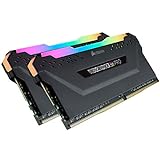
- High performance DDR4 memory illuminates your system with vivid, animated lighting from ten ultra-bright, individually addressable RGB LEDs per module.
- Take control with CORSAIR iCUE software and synchronize lighting across all your CORSAIR iCUE compatible products, including memory, fans, coolers, keyboards and more.
- Customize lighting profiles with millions of different patterns and colors, or create your own in CORSAIR iCUE software.

Each module carries ten individually addressable LEDs across the top diffuser, controlled through Corsair’s iCUE software with no extra cabling involved. The kit is well-rated among thousands of buyers and carries a limited lifetime warranty.
Bottom Line
For a DDR4 platform that still has years of life left, this kit delivers a meaningful capacity jump with lighting you can tune or simply leave alone.
Check current availability and pricing on Amazon.
CORSAIR Vengeance RGB PRO 32GB 3600MHz Overview
Two 16GB DIMMs make up this kit, with each one being a standard 288-pin module built on a custom PCB that Corsair screens for signal quality and overclocking headroom. Model number CMW32GX4M2Z3600C18 identifies the specific 3600MHz CL18 variant.
The aluminum heat spreader comes in black and is topped with a light diffuser spanning the full length of the module. Height can be an issue with large air coolers, so it’s worth checking that clearance before purchase.
Corsair backs the kit with a limited lifetime warranty. If you’re comparing it with other options in the same class, our roundup of the best DDR4 RAM covers the broader field.
3600MHz DDR4 Performance for Gaming and Multitasking
At 3600MHz with CL18-22-22-42 timings, this kit lands where Ryzen’s Infinity Fabric runs at a 1:1 ratio, the configuration AMD builders typically target for latency-sensitive workloads. Intel systems from 10th gen onward handle the speed comfortably, too.
Capacity is where 32GB earns its place. Game installs, browser tabs, Discord, and a streaming encoder can push past 16GB more often than they did a few years ago.
Content creation benefits even more directly. Timeline scrubbing in video editors and multi-layer photo work both respond to available memory before they respond to raw frequency.
Ten-Zone RGB Lighting and iCUE Control
Ten addressable LEDs per stick give the diffuser enough resolution for wave, rainbow, and gradient effects that look smooth instead of blocky. Across the pair, twenty zones cover a decent stretch of the motherboard.
iCUE handles pattern selection, color assignment, and speed, while Light LINK ties memory lighting to other Corsair gear such as fans, keyboards, and coolers like the iCUE Link Titan 360 RX.
Motherboard software from MSI, ASUS, and Gigabyte also detects the modules in many builds. That leaves iCUE as an option rather than a requirement if you prefer to manage everything from one app.
DDR4 Motherboard Compatibility and Installation
Any DDR4 desktop motherboard with 288-pin DIMM slots accepts this kit, covering Intel and AMD platforms alike. The wire-free lighting design means installation is the same as with any standard memory module: seat it, clip it in, done.
What Should Buyers Check Before Installing This Kit?
Confirm three things before ordering. Your motherboard must support DDR4, since DDR5 boards use a different and incompatible slot, and your CPU cooler needs enough clearance for the module height.
Your board’s QVL is also worth a quick scan if you’re running a first or second-generation Ryzen chip. It isn’t always essential, but it can save some troubleshooting later.
Populate the slots your manual specifies for dual-channel operation, usually A2 and B2. Using the wrong slots is a common cause of single-channel performance on a two-stick kit.
Enabling XMP or DOCP for the Rated Memory Speed
The modules boot at a JEDEC default near 2133MHz until you turn on the stored profile. In BIOS, enable XMP on Intel boards or DOCP on ASUS AMD boards, then save and reboot.
Verify the result in Task Manager or CPU-Z. If 3600MHz refuses to post, updating the motherboard BIOS resolves it in most cases, since memory training improved substantially across firmware revisions on AM4 and Z490-era boards.
Pros and Cons
Pros
- 32GB across two DIMMs leaves the other two slots open for a later expansion
- 3600MHz suits the 1:1 Infinity Fabric target on Ryzen systems
- Ten addressable LEDs per module with no lighting cables to route
- Works with iCUE or with most motherboard RGB software
- Limited lifetime warranty from Corsair
Cons
- CL18 timings are looser than premium 3600MHz kits with CL16 latency
- Module height can conflict with tall air coolers
- 1.35V requires XMP or DOCP; the kit runs at JEDEC speed by default
- iCUE adds background software if you want full lighting control
- DDR4 is a sunset platform, so this is an upgrade for existing builds
What Customer Reviews Reveal
Buyer feedback skews strongly positive, with recurring themes of straightforward installation, stable operation at rated speed, and lighting that integrates with existing setups.
Reported Performance and Upgrade Benefits
Owners upgrading from 16GB describe noticeably smoother multitasking and workflow improvements, particularly on Ryzen builds paired with chips like the 5800X and 5950X.
Several buyers switched to this kit after other brands failed to run in dual channel on their boards, then reported that the Corsair modules trained correctly on the first attempt. Lighting compatibility with MSI’s software also came up as a positive for builders who’d rather not install iCUE.
Common Setup Considerations
The most frequent hiccup involves XMP not holding 3600MHz on the first try. One buyer exchanged a kit for this reason and had the replacement post at full speed immediately after enabling the profile.
Reports like that point to board and firmware variability more than to the modules themselves. Checking your BIOS version before installation heads off most of the trouble.
Conclusion
For anyone running an AM4 or LGA1200-era board, this kit offers the capacity and frequency combination that DDR4 platforms respond to best, with lighting that stays out of the way if you never open iCUE.
Builders on newer platforms should look at DDR5 instead; the Corsair Vengeance RGB DDR5 32GB 6000MHz CL36 covers that side.
Before you order, confirm your cooler clearance and note your current BIOS version so you can update it if the XMP profile doesn’t hold on the first boot.
Frequently Asked Questions
Is the Corsair Vengeance RGB Pro 32GB 3600MHz kit good for gaming?
Yes, 32GB at 3600MHz covers current gaming requirements with room for background applications like Discord, a browser, and streaming software. The 3600MHz frequency matches the 1:1 Infinity Fabric ratio Ryzen CPUs prefer, which can help frame time consistency in CPU-bound titles.
Does Corsair Vengeance RGB Pro work with AMD and Intel DDR4 motherboards?
It works with both, provided the board uses DDR4 288-pin DIMM slots. Corsair validates the modules against current AMD and Intel DDR4 platforms, though older first-generation Ryzen boards sometimes need a BIOS update to reach the full 3600MHz profile.
Do I need to enable XMP or DOCP to get 3600MHz?
Yes. The kit boots at a JEDEC default speed around 2133MHz until you enable the XMP profile on Intel boards or DOCP on ASUS AMD boards through your BIOS, then save and restart.
What type of RAM is Corsair Vengeance RGB Pro?
It is DDR4 desktop memory in the 288-pin DIMM form factor, sold here as a 2x16GB dual-channel kit rated at 3600MHz, CL18-22-22-42, and 1.35V. Laptop builders need SODIMM modules instead, such as the Corsair Vengeance SODIMM DDR4 32GB.
Does Corsair Vengeance RGB Pro require extra cables for RGB lighting?
No. The LEDs draw power and receive signals through the DIMM slot, so there are no separate RGB headers or cables to connect. That keeps cable routing behind the motherboard tray unchanged.
TechBytes

Our mission is to showcase the complex world of technology with comprehensive, accessible reviews. We bring you the freshest insights on everything from the most streamlined smartphones to the mightiest laptops, as well as the latest in smart home gadgets that simplify your daily routine and fitness wearables that monitor your well-being. Rest assured, we're here to guide you through the ever-evolving tech landscape.
