
Shopping for a 240mm all-in-one liquid cooler usually means choosing between budget units that run loud and premium models that cost as much as a mid-range GPU. The CoolerMaster MasterLiquid ML240L RGB V2 sits between those extremes, and it has stayed on shelves for years because the formula works.
This is a dual-chamber-pump AIO with a 240mm radiator and two SickleFlow 120mm RGB fans, rated for roughly 62 CFM and 1800 RPM each. It handles mainstream Intel and AMD chips without the drama of custom loops.
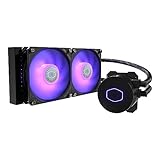
- 3rd Generation Dual Chamber Pump for overall cooling efficiency and performance
- New SickleFlow Refreshed exterior design for improved lighting and fan blades for a quiet airflow performance
- RGB Lighting Signature cooling performance with an RGB design for all of the users wanting lighting effects that are fully customizable

The pump uses a third-generation dual chamber design that separates hot and cold coolant paths. The loop is sealed with industrial-grade EPDM rubber to reduce permeation and leak risk over time, and Cooler Master backs it with a two-year warranty.
Bottom Line
If you want a well-rated 240mm AIO that keeps a Core i7 or Ryzen 7 in check while adding RGB to the build, the ML240L RGB V2 is a sensible pick.
Check current pricing and availability on Amazon.
Cooler Master MasterLiquid ML240L RGB V2 Overview
Think of this as the refreshed version of the MasterLiquid Lite line, with a redesigned pump housing, a larger radiator surface, and updated fans. The kit weighs about 1,340 grams assembled and runs on standard 12V power through a 4-pin PWM header.
| Spec | Detail |
|---|---|
| Radiator | 240mm |
| Fans | 2x SickleFlow 120 PWM RGB |
| Max fan speed | 1800 RPM |
| Airflow | 62 CFM per fan |
| Noise rating | 30 dB |
| Rated wattage | 260W |
| Warranty | 2 years |
Everything needed for a standard install ships in the box, including a small tube of thermal paste. For a broader look at where it lands against competitors, our roundup of the best liquid cooling system for PC builds is worth a read.
3rd Gen Dual Chamber Pump Cooling Performance
Splitting the pump into separate intake and exhaust chambers keeps returning hot coolant from mixing with the chilled liquid heading to the cold plate. That improves the temperature delta across the block.
In practice, the difference shows up under load more than at idle. Owners running a Core i7-10700K overclocked past 5.0 GHz report idle figures in the 38C to 50C range, climbing toward 90C only during sustained stress testing.
Ryzen 7 5800X owners see a similar pattern, with peaks in the low 80s under heavy multi-core work. That behavior is consistent with a 260W-rated 240mm loop paired with a hot-running chip, and it leaves headroom for gaming workloads that rarely hit those sustained peaks.
The pump itself stays quiet during normal operation, though a faint hum is audible in an otherwise silent room.
240mm Radiator and SickleFlow Fan Design
The V2 radiator gained surface area over the original Lite series, giving the fans more fin stack to work with at lower RPM. That translates to usable cooling at fan speeds well below the 1800 RPM ceiling.
SickleFlow 120 fans use Air Balance blade geometry aimed at holding static pressure through dense radiator fins. Each moves up to 62 CFM, with a 30 dB rating at full tilt.
Set a moderate PWM curve and the pair fades into the background during browsing or light gaming. Push them to maximum, though, and they become clearly audible. That’s the tradeoff on any thin 240mm radiator.
Compared with a thicker 360mm unit like the Arctic Liquid Freezer III 360 A-RGB, this kit trades raw thermal ceiling for a smaller footprint.
RGB Lighting and System Aesthetics
Lighting covers both fan hubs and the pump cap, controlled through your motherboard’s 12V RGB header or the bundled controller. The effect is bright and even across the fan blades.
One detail to note before buying: the fans use standard 12V RGB rather than individually addressable 5V ARGB on this SKU. Per-LED effects and rainbow waves across individual blades are off the table, so you get synchronized color modes instead.
Through a tempered glass side panel, the pump cap’s diffused glow reads well and matches most motherboard sync software. Builders coordinating a full lighting theme often pair it with USB LED light strips behind the case for backlighting.
Socket Compatibility and Installation Experience
Mounting hardware covers AMD AM4, AM3+, AM3, AM2+, AM2, FM2+, FM2 and FM1, plus Intel LGA1200, 1151, 1150, 1155, 1156, 1366, 2066, 2011-v3 and 2011. LGA1700 requires Cooler Master’s separate bracket kit, sold under part 603005870-GP.
Installation follows the usual AIO sequence: attach the backplate, screw standoffs into place, mount the radiator, then seat the pump block. Budget 45 minutes if you’ve built before.
The printed instructions are picture-only with no text, which can trip up first-time builders. Several owners reported spending hours on their first attempt before turning to video walkthroughs.
The steps themselves are correct; the documentation just assumes prior experience. Tube length is the other consideration. In taller full-tower cases with top-mounted radiators, the hoses can come up short depending on how far the socket sits from the top panel.
Customer Reviews and Real-World Feedback
Thousands of buyers have weighed in, and the aggregate score sits comfortably in well-rated territory for the category. Feedback clusters around a few consistent themes.
What Buyers Like Most
Temperature improvement over stock coolers and older AIOs is the most common praise. One reviewer upgrading from an aging Corsair unit noted idle temperatures dropping from the 50C range, with peak gaming loads falling well below the previous 80C ceiling.
Build quality earns steady mentions, particularly the fit of the mounting hardware and the completeness of the accessory bundle. The included thermal paste tube saves a separate purchase.
Value comes up repeatedly. Multiple buyers describe choosing it over a basic air cooler for a small price difference and considering that a clear win.
Common Installation and Fitment Concerns
Picture-only instructions are the single most repeated complaint. Newcomers describe long, frustrating first installs that video guides eventually resolved.
Tube length draws criticism in specific case layouts, especially where the radiator sits at the top of a large chassis. Measure before ordering if your case is unusually tall.
A smaller group notes that hot chips like the Ryzen 7 5800X still hit the low 80s under load, even undervolted. Some also expected addressable RGB and were surprised to find standard 12V lighting.
Pros and Cons
Weighing it against other 240mm AIOs in the same tier, the strengths and limitations sort out clearly.
Pros
- Dual chamber pump delivers solid thermals for the price bracket
- Quiet at moderate PWM speeds with a smooth fan curve
- Complete mounting kit plus thermal paste in the box
- EPDM sealing and a two-year warranty
- Broad AMD and Intel socket coverage
- Bright, even RGB across fans and pump cap
Cons
- Lighting is 12V RGB, not individually addressable
- Picture-only manual is unhelpful for first-time builders
- Tubing can be short in tall full-tower cases
- LGA1700 bracket sold separately
- Fans get loud at full 1800 RPM
- High-TDP chips still push into the 80s under sustained load
Conclusion
For a mainstream gaming build running a Core i7, Ryzen 7, or anything below the flagship tier, this cooler covers the job at a price that leaves budget for other components. The dual chamber pump and enlarged radiator earn their keep in sustained loads, and the fans stay civil as long as you tune a curve instead of running them at full speed.
Confirm two things before ordering: your case supports a 240mm radiator with roughly 27mm of clearance plus fan thickness, and you have the LGA1700 bracket if you’re on a 12th-gen or newer Intel platform. Builders on a hot 16-core chip or planning aggressive overclocks should look at a 360mm unit such as the Corsair iCUE Link Titan 360 RX RGB instead.
See the current listing on Amazon.
Frequently Asked Questions
Is the Cooler Master ML240L RGB V2 good for gaming PCs?
Yes, it handles gaming loads on mainstream Intel and AMD processors comfortably. Gaming rarely produces the sustained all-core stress that pushes a 240mm loop to its limits, so temperatures during play stay well below the peaks seen in synthetic benchmarks.
Does the Cooler Master ML240L RGB V2 come with thermal paste?
Yes, a small tube of thermal compound ships in the box alongside the mounting hardware. Buyers consistently note that nothing extra is needed for a standard installation, though some builders prefer to substitute their own preferred paste.
Is a 240mm liquid cooler enough for an Intel Core i7 or AMD Ryzen 7 CPU?
A 240mm radiator handles both chip classes at stock settings and moderate overclocks. Expect peak temperatures in the low-to-mid 80s Celsius under sustained heavy load on a Ryzen 7 5800X, with more headroom on cooler-running SKUs.
Does the ML240L RGB V2 support Intel LGA1700 and AMD AM4 sockets?
AM4 support is included in the box, along with AM5 compatibility and older AMD sockets back to AM2. LGA1700 requires Cooler Master’s separate bracket kit under part number 603005870-GP, which is sold on Amazon.
Are the fans on the Cooler Master ML240L RGB V2 quiet?
At moderate PWM speeds, the SickleFlow fans are quiet enough to disappear behind case noise. Their 30 dB rating applies at the full 1800 RPM ceiling, where they become clearly audible, so a tuned fan curve is worth setting up in BIOS.
Will the ML240L RGB V2 fit in my PC case?
Check that your case lists 240mm radiator support and has clearance for a roughly 27mm-thick radiator plus 25mm fans. It’s also worth verifying tube reach in a tall full-tower chassis, since some owners with top-mounted radiators in larger cases have found the hoses a little tight.
TechBytes

Our mission is to showcase the complex world of technology with comprehensive, accessible reviews. We bring you the freshest insights on everything from the most streamlined smartphones to the mightiest laptops, as well as the latest in smart home gadgets that simplify your daily routine and fitness wearables that monitor your well-being. Rest assured, we're here to guide you through the ever-evolving tech landscape.
