
Printing at home just makes life easier. You get control, you skip the lines, and you don’t have to panic when you need a last-minute document.
A home laser printer is a solid pick for anyone who prints text, forms, or the occasional graphic. They’re typically faster and cheaper per page than inkjets—plus, toner doesn’t dry out if you forget about it for a month.
So, what actually matters when you’re choosing a home laser printer? Do you need color, or is black and white enough?
Think about your monthly print volume, and don’t forget to check if it’ll connect to WiFi or your phone. Monochrome laser printers are usually cheaper upfront and in the long run, but color models are nice if you want to print charts or splashy presentations.
Print speed—pages per minute—can vary a ton. It’s worth checking if you’re impatient or have big jobs.
Paper capacity and whether there’s an automatic document feeder also matter if you deal with multi-page docs regularly.
Best Home Laser Printers
Here’s our rundown of the best home laser printers right now. We looked at print quality, speed, reliability, and overall value for what most home offices need.

- ALL-IN-ONE FUNCTIONALITY FOR HOME AND OFFICE - The Xerox C235dni is a compact and quiet multifunction printer that can print, copy, scan fax and email. With print speeds of up to 22ppm in color and black & white it's ideal for small to medium-sized businesses and home offices. The printer supports automatic two-sided printing, has 250-sheet paper capacity, high resolution image quality and a recommended monthly print volume of up to 1,500 pages.
- EASY SET UP & SUPPORT: Set up your printer quickly and easily using the Xerox Easy Assist App. Access guided setup, real-time monitoring, and self-service support tools right from your mobile device - no need to wait for IT support.
- CONVENIENCE & CONNECTIVITY: Built-in Wi-Fi with Apple AirPrint, Mopria, and Chromebook support—plus easy setup with no IT needed.

Xerox C235dni Color Laser Printer

The Xerox C235dni is a workhorse for home offices and small businesses that want solid color prints and easy multifunction features—without tech headaches.
Pros
- Wireless setup is painless, and mobile printing works on just about anything
- Automatic duplex printing handles both letter and legal sizes
- Color touchscreen is actually intuitive for once
Cons
- Starter toner runs out faster than you’d hope
- Regular color printing gets expensive with replacement toner
- Paper jams happen once in a while and need manual fixing
Unboxing the C235dni is straightforward, but you’ll spend a few minutes hunting for all the tape and packaging. Wireless setup was smooth, and the 2.8-inch touchscreen made it easy to get to printing, scanning, or copying without digging through menus.
Mobile printing from phones and tablets worked right away, no IT degree needed. Print speeds matched the promised 22 pages per minute for both color and black and white.
The 50-sheet auto document feeder was a lifesaver for multi-page scans—no babysitting required. Duplex printing worked like a charm, so you’ll use less paper for big reports.
Color output was more than good enough for business docs, presentations, and the occasional photo. At 1200 dpi, text looked sharp and graphics had decent pop.
Scanning through the Xerox mobile app was easy, with handy tools like auto-straighten and cropping. The 250-sheet paper tray meant fewer refills, which is always welcome.
It weighs 35 pounds, so don’t expect to move it around much, but it fits on a regular desk. Printing noise is moderate—not silent, but not disruptive either.
Toner costs are the biggest downside. The included cartridges didn’t last long, and replacements are pricey, especially for color. If you mostly print in black and white, it’s a better value.
Recommended monthly volume is 1,500 pages, which lines up with most small office needs. Security features are basic but cover the essentials for wireless printing.
You get a one-year warranty, and you can stretch it to three years with product registration. In some places, buying genuine Xerox toner extends that further.

- HP LaserJet M209dw Wireless Printer, Print, Fast speeds, Easy setup, Mobile printing, Best-for-small teams, Instant Ink eligible
- Perfect for small teams printing black & white documents and reports, plus auto two-sided printing. Perfect for 1-5 people
- FASTEST TWO-SIDED PRINTING IN ITS CLASS – Up to 30 black-and-white pages per minute single-sided, u up to 19 black-and-white images per minute two-sided printing
HP LaserJet M209dw
This HP is a no-nonsense pick for small teams who want fast, double-sided printing and don’t want to mess with complicated setup.
Pros
- Dual-band Wi-Fi fixes its own connection issues—seriously, it’s a relief
- Automatic duplex at 19 ppm saves time and paper
- Mobile printing works across devices without drama
Cons
- Monochrome only—no color, which might be a dealbreaker for some
- Wi-Fi setup needs location services on your phone (kind of annoying)
- Starter toner only lasts about 700 pages
The M209dw is fast. Single-sided prints zip out at 30 pages per minute, and duplex printing keeps up at 19 ppm. It’s a practical choice for regular reports or everyday docs.
Wireless setup with the HP Smart app took maybe half an hour, tops. The dual-band Wi-Fi is a real improvement—no more dropped connections like some older Brother models.
Duplex printing worked without a hitch, even for longer jobs. Print quality is crisp at 600 x 600 dpi—nothing fancy, but it gets the job done for business documents.
Mobile printing from Android devices was reliable after setup. The HP Smart app is handy for quick scans to cloud storage, and printing from your phone is genuinely hassle-free.
The 150-sheet input tray is enough for a few days of moderate use. At just over 12 pounds, it’s easy to move and doesn’t hog desk space. It also runs quietly, so you won’t annoy your coworkers or family.
Brother MFC-L2900DW
This all-in-one laser printer is a solid pick for home offices that want fast, reliable black-and-white printing—without babying their printer every week.
Pros
- Prints at 36 pages per minute and wakes up fast
- Single-pass duplex scanning is a huge time-saver
- Compact enough for most desks, but still packs in all the features
Cons
- Black and white only—no color option
- Starter toner is only good for about 700 pages
- Touchscreen feels a bit outdated
Speed is the headline here. From sleep mode to first page is just a few seconds, and the 36 ppm output keeps up with even heavy days. The 250-sheet tray means you’re not refilling constantly.
Wireless setup was straightforward on every device we tried. Dual-band Wi-Fi works with both 2.4GHz and 5GHz, and the Brother Mobile Connect app makes remote printing from your phone pretty easy.
Ethernet and USB are there if you need them. The automatic document feeder holds 50 sheets and scans both sides at once, which is actually a big deal if you scan contracts or long docs often.
The flatbed scanner is handy for bound stuff or thicker materials. Print quality is sharp at 1200 x 1200 dpi—great for professional documents and presentations.
Duplex printing worked without jamming, and the 3.5-inch touchscreen is simple to navigate, even if it’s not the flashiest. Direct access to Google Drive and Dropbox is convenient for quick uploads.
Energy use dropped compared to the older Brother model it replaced, and the faster warmup time is noticeable. Maintenance is pretty painless with Brother Genuine supplies.
The TN830 toner cartridges are easy to swap, and you can track toner levels in the app so you’re not caught off guard. The drum unit lasts around 15,000 pages before you need to think about replacing it.
This small business laser printer keeps up with daily demands without constant maintenance. Not perfect, but honestly, it’s hard to find much to complain about for the price.
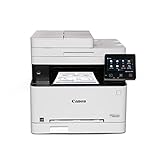
- Wireless 4-in-1 (print, scan, copy, fax)
- Print up to 22 pages per minute (bw / color, letter)
- Uses Toner 067 / 067 High Capacity Toner - high capacity toner options keep up with your printing needs and limit toner replacement interruptions
Canon imageCLASS MF656Cdw
This all-in-one color laser printer is built for small offices that want steady printing, scanning, copying, and faxing—without running for supplies every week.
Pros
- Handles double-sided printing and scanning automatically, saving time on multi-page documents
- Large touchscreen interface makes navigation straightforward and reduces learning curve
- Supports mobile printing from smartphones and tablets without requiring a computer connection
Cons
- Weighs nearly 50 pounds, making relocation or desk adjustments challenging
- Startup time of over 10 seconds means waiting before the first page prints
- Noise level during operation is noticeable enough to be distracting in quiet spaces
The 5-inch color touchscreen is actually pretty handy. Navigation feels simple, and you don’t have to dig through the manual to change settings.
The display reacts fast, and the menus just make sense. You won’t get lost poking around.
Print quality is right where it should be for business docs. Text is sharp, colors are punchy enough for presentations or flyers.
It cranks out 22 pages per minute, so you’re not left hanging, though it does need a few seconds to wake up from sleep.
Wireless setup is painless. The printer latches onto WiFi and holds the connection without drama.
Printing from the Canon app is smooth, whether you’re on iOS or Android. No weird glitches.
The automatic document feeder fits 50 sheets and does double-sided scans in one go. That’s a lifesaver for contracts or thick reports.
Paper jams? Pretty rare here. The 250-sheet tray means you’re not refilling constantly.
Toner lasts a decent while, especially if you go for the high-capacity ones. Cost adds up if you’re a heavy user, but at least the printer gives you a heads-up before you run out.
Build feels sturdy, even if it’s mostly plastic. The three-year warranty is reassuring.
Canon’s support folks are helpful if you stumble during setup or run into snags.

- Best for Small Businesses,the Brother MFC-L3780CDW wireless multi-function digital color printer with copy, scan, and fax functionalities consistently produces pristine, laser-quality output on every page
- AMPLIFY YOUR PROFESSIONAL DOCUMENTS. With the consistent performance of laser-quality digital color printing
- MAXIMIZE EFFICIENCY WITH ALL-IN-ONE FUNCTIONALITY. Achieves print speeds up to 31 ppm(1) and scan speeds up to 29/22 ipm(2) (black/color) with the added timesaving benefit of single-pass duplex copy and scan
Brother MFC-L3780CDW
This all-in-one color laser printer is designed for small offices that chew through big print jobs and want something that won’t flinch under pressure.
Pros
- Prints and scans remarkably fast at 31 pages per minute
- Touchscreen interface makes navigation straightforward and intuitive
- Automatic duplex printing reduces paper usage significantly
Cons
- Weighs nearly 48 pounds, making relocation challenging
- Subscription service prompts can feel intrusive
- Takes up considerable desk space at over 18 inches wide
The Brother MFC-L3780CDW puts out color prints that look sharp and clean. Text is crisp, and you don’t get weird color smears or streaks.
Wireless setup is easy. The 3.5-inch touchscreen reacts fast, and the menus are pretty logical.
Single-pass duplex scanning is a real time-saver for big document stacks. No need to babysit the machine flipping pages.
Print speeds? Yeah, it really does hit 31 pages per minute. The 250-sheet tray means less refilling, and toner lasts for thousands of pages.
The printer feels solid—almost overbuilt. But wow, it’s heavy, so think about where you’ll park it before you start lifting.
It’s wide, too, so make sure you’ve got the desk space. Not the best fit for a tiny home office, honestly.
Network printing works across all your devices. Brother’s app makes mobile printing painless, and jobs go through fast from your phone or tablet.
One thing: the subscription reminders for toner can get a little annoying. If you’d rather buy cartridges as needed, you might get tired of the pop-ups.
Security’s covered with NFC badge authentication, which is a nice touch for sensitive stuff. Eco features like auto-duplex and toner save mode help keep costs down.
For reliable color printing in a busy small business, this Brother model really delivers. It’s more than just a printer—it’s a workhorse.
Buying Guide
If you’re shopping for a home laser printer, start by thinking about your main printing needs. How much do you print? Is color a must-have, or can you live with just black and white?
Print Speed and Volume
Speed matters if you’re always printing long docs. Entry-level models do about 20-25 pages per minute, but some can crank out 40+.
Monthly duty cycle tells you how much the printer can handle before it starts wearing out.
| Duty Cycle | Best For |
|---|---|
| Up to 2,000 pages | Light home use |
| 2,000-5,000 pages | Regular home office work |
| 5,000+ pages | Heavy daily printing |
Connectivity Options
Most printers now offer a bunch of ways to connect. USB is reliable and simple.
Wi-Fi lets you print from anywhere in the house, while Ethernet is good for a more fixed setup. Mobile printing is pretty much a must these days—nobody wants to email themselves a file just to print it.
Cost Per Page
Toner prices and how many pages you get per cartridge really add up over time. High-yield cartridges cost more at first but save money per page in the long run.
If you’re curious, just divide the cartridge price by the page yield to get the actual cost per page.
Additional Features
Automatic duplex printing saves trees (and money) by using both sides of the paper. A big paper tray means you’re not refilling every other day.
LCD screens make troubleshooting less of a headache. If you’re short on space, look for compact models—they do exist!
Color vs. Monochrome
Monochrome printers are cheaper and great for text. Color lasers handle graphics and presentations, but you’ll need four toners instead of just one.
Frequently Asked Questions
Picking a home laser printer isn’t just about price—it comes down to print volume, color needs, how you want to connect, and what it’ll cost over time. Features like duplex printing and wireless are huge for convenience.
What features should I look for in a laser printer for home use?
Auto duplex printing saves paper and hassle—no flipping pages by hand. Wireless means you can print from your couch, your kitchen, or even the backyard if the signal’s strong enough.
If you print a lot, speed matters; most home models do 20-40 pages per minute. A 250-sheet tray is nice so you’re not constantly topping off paper.
Look for mobile printing—AirPrint, Google Cloud Print, or the manufacturer’s app. And if you’re tight on space, double-check the dimensions before you buy.
Which laser printer offers the best quality for color printing at home?
The HP Color LaserJet Pro M455dn stands out for color with 600 x 600 dpi and HP’s ImageREt 3600 tech. Text is sharp, graphics pop—great for presentations or marketing.
Brother HL-L8360CDW is another solid pick, with 2400 x 600 dpi and good speeds. It even handles photo paper and cardstock without a fuss.
Canon Color imageCLASS MF743Cdw balances color and features, holding steady at 600 x 600 dpi. Built-in color correction keeps prints consistent across jobs.
How do all-in-one laser printers compare to single-function models for home users?
All-in-ones combine printing, scanning, copying, sometimes faxing—so you save space and don’t need a pile of gadgets. Single-function models are cheaper and often a bit faster for just printing.
If you ever scan or copy, an all-in-one is worth it. The Brother MFC-L3770CDW and HP LaserJet Pro MFP M479fdw pack a lot into one box.
If you only print, the Brother HL-L2350DW is a no-nonsense option. Fewer moving parts means less that can break down.
Can you recommend a durable laser printer suitable for home office tasks?
The Brother HL-L6200DW is built for heavy use—up to 50,000 pages monthly. It’s tough, reliable, and handles big jobs without flinching.
HP LaserJet Pro M404dn is another workhorse with an 80,000-page monthly cycle. Security features are a bonus if you’re printing sensitive stuff.
Canon imageCLASS LBP226dw feels solid and is rated for 4,000 pages a month. It keeps print quality steady even after a lot of use.
What should I consider when choosing between a color and a monochrome laser printer for my home?
Think about what you print most. Monochrome is perfect for text, invoices, or contracts. Color is better for presentations, marketing, photos, or school projects.
Running costs are lower with monochrome—toner’s cheaper and lasts longer. You’re looking at maybe $0.02-$0.03 per page, while color can hit $0.10-$0.15.
If you don’t print color often, those extra cartridges can dry out or need replacing anyway. Monochrome is simpler and cheaper to maintain if you’re not using color regularly.
What is the most cost-effective laser printer for long-term home use?
The Brother HL-L2350DW is hard to ignore if you’re watching your budget. It’s got a low up-front price and uses TN-760 toner cartridges, which last for about 3,000 pages.
Honestly, the design is pretty straightforward, and you won’t be fiddling with repairs much. That’s a big plus if you just want something that works year after year.
HP’s LaserJet Pro M404n is another strong contender. With those high-yield 148X toner cartridges, you can get up to 17,000 pages before needing a replacement.
The cost per page drops to around $0.018 for text, which is pretty impressive. If you print a lot, that adds up to real savings.
Canon’s imageCLASS MF267dw brings a little more to the table. It’s got multifunction features—scan, copy, fax—and uses 057H cartridges good for 10,000 pages.
The built-in duplexer is handy, too. Default two-sided printing means you’re not wasting paper, which is something I always appreciate.
TechBytes
Our mission is to showcase the complex world of technology with comprehensive, accessible reviews. We bring you the freshest insights on everything from the most streamlined smartphones to the mightiest laptops, as well as the latest in smart home gadgets that simplify your daily routine and fitness wearables that monitor your well-being. Rest assured, we're here to guide you through the ever-evolving tech landscape.
