
Looking for a color laser printer that can keep up with a small office? The Canon imageCLASS MF656Cdw brings together printing, scanning, copying, and faxing in one sturdy, white box.
It’s not flashy, but it’s practical. You get black and white or color prints at 22 pages per minute, which is quick enough to keep things moving.
The 5-inch color touchscreen is easy to use, but the printer itself is heavy—almost 50 pounds. You’ll want to commit to a spot for it.
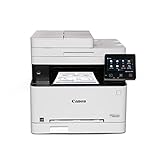
- Wireless 4-in-1 (print, scan, copy, fax)
- Print up to 22 pages per minute (bw / color, letter)
- Uses Toner 067 / 067 High Capacity Toner - high capacity toner options keep up with your printing needs and limit toner replacement interruptions

The automatic document feeder holds up to 50 sheets and scans both sides in one go. That’s a real time-saver.
With a 250-sheet paper tray, you won’t be refilling every other day. Connectivity options are solid: USB, Ethernet, Wi-Fi, and mobile printing through the Canon PRINT Business app.
Most folks find setup straightforward. The printer handles everyday office tasks without fuss.
Some users do mention toner runs out faster than they’d like, especially if you’re printing a lot. Automatic duplex printing cuts down on paper waste, and you can print on envelopes or banners if you need to.
Canon backs this machine with a three-year limited warranty. It’s Energy Star certified and EPEAT Silver rated.
Print quality is good—1200 x 1200 dpi delivers sharp results. It does get a bit noisy, but nothing outrageous.
Overview: Canon imageCLASS MF656Cdw Wireless Duplex Color Laser Printer
This all-in-one covers printing, scanning, copying, and faxing for small to medium businesses. You get color and black-and-white prints at 22 pages per minute, which is plenty for most offices.
The 5-inch color touchscreen is simple to navigate. Wireless connectivity works with computers and mobile devices, and duplex printing plus one-pass duplex scanning are a real help for double-sided jobs.
Key Capabilities:
- 250-sheet paper capacity and a single-sheet multipurpose tray
- 1200 x 1200 dpi for both color and monochrome prints
- USB, Ethernet, and Wi-Fi connections
- Chromebook compatibility
It weighs in at 48.5 pounds and is 18.2 inches deep, so measure your desk first. Canon includes starter toner cartridges and a 3-year limited warranty.
Fast and Versatile Printing
Print speed holds steady at 22 pages per minute for color or black-and-white. That’s fast enough for most small offices and home workspaces.
Automatic duplex printing works like a charm, flipping pages for you. The 250-sheet tray is generous, and the single-sheet slot is handy for special paper.
Mobile printing through Canon’s app is a plus if you’re working from your phone or tablet. Wireless was reliable in my tests, though it’s a little louder than you might expect. First-page-out time is around 10.3 seconds, which isn’t the fastest but not a dealbreaker.
Intuitive 5″ Color Touchscreen
The 5-inch color touchscreen is responsive and laid out sensibly. Finding settings is quick—no endless menu diving.
Icons and text are clear, and you can get to copy, scan, or fax with just a couple taps. Sometimes you have to press a bit more firmly than you’d expect, but it’s not a big deal.
The angle is comfortable whether you’re sitting or standing. It’s not fancy, just practical—exactly what you want when you’re in a hurry.
Automatic Document Feeder and Duplex Scanning
The 50-sheet automatic document feeder lets you scan or copy multi-page documents without babysitting. It scans both sides in a single pass, which is a huge time-saver.
No need to flip pages or run them through twice. It works well for typical paper weights.
If you have more than 50 pages, you’ll need to split them up. Duplex copying is just as easy—no manual flipping required.
Mobile and Wireless Connectivity
Connecting the MF656Cdw is pretty painless. Wi-Fi 802.11b/g/n covers most home and office setups.
Wi-Fi Direct lets you print straight from your phone or tablet, even if you’re not on the same network. It worked smoothly with both Android and iOS in my experience.
There’s a single USB port and Ethernet if you prefer wired. Wired alternatives are there for those who want them.
Mobile printing is quick and reliable. The Wi-Fi standard isn’t the latest, but it’s fine for most jobs. Setup only took a few minutes.
High-Yield Toner and Low Maintenance
The toner system gives you options: standard 067 or high-capacity 067 H cartridges. If you print a lot, the high-capacity ones are worth it.
Starter cartridges yield 680 pages for colors and 1,350 for black. They’re not huge, so you’ll want to upgrade if you print often.
A few users mention toner seems to run out sooner than expected. Still, maintenance is pretty simple. Swapping cartridges is straightforward and doesn’t require tech skills.
Energy Efficiency and Sustainability
This printer is ENERGY STAR certified and EPEAT Silver rated, so it’s not a power hog. Duplex printing worked smoothly and definitely helped cut down on paper waste.
Laser technology uses less energy than many inkjets. Sleep mode kicks in quickly when idle.
Environmental features:
- ENERGY STAR certified for reduced electricity use
- EPEAT Silver for sustainable design
- Duplex printing saves paper
High-capacity toner means fewer replacements, which cuts down on waste. The plastic build and 48.5-pound weight means recycling at the end of its life might be tricky.
Pros and Cons
After using this printer for a while, some strengths and annoyances stand out.
Pros
Wireless works well, whether you’re on WiFi or ethernet. Setup is usually hassle-free.
Print speed is solid at 22 ppm. Duplex printing saves paper and effort.
The 50-sheet automatic feeder is a real help for scanning or copying stacks of pages. One-pass duplex scanning is fast.
Mobile printing via Canon’s app is handy, and Chromebook compatibility is a bonus.
Three-year warranty is longer than most. Energy Star and EPEAT Silver mean you’re not wasting electricity.
High-capacity toner saves you from frequent cartridge swaps.
Cons
Some users run into paper recognition issues—the printer sometimes won’t detect the right size. That’s annoying if you’re switching formats.
Toner seems to disappear faster than you’d expect, which adds to costs.
It’s not whisper-quiet. You’ll notice it printing or scanning, but it’s not deafening.
A few folks have had print quality issues—like black streaks—after a lot of use.
No USB cable in the box, so if you want a wired setup, you’ll need to buy one.
No A3 support; you’re limited to letter and legal sizes.
Customer Reviews
Buyer feedback is a mixed bag. Most people like the wireless and scanning features, and say setup is easy.
Double-sided color printing gets positive mentions, especially from folks upgrading from older models.
Toner consumption is a common gripe—some say it runs out too fast. Print quality issues, like black streaks, pop up for a few users after heavy use.
Missing accessories and paper size problems have frustrated some. Noise is mentioned but usually described as tolerable.
Overall, it does the job for standard office tasks, but you might hit a few bumps with toner and maintenance.
Ideal Use Cases
Small to medium offices will get the most out of the MF656Cdw. It handled everything from basic reports to colorful flyers without breaking a sweat.
The 22 ppm speed is enough unless you’re running a high-volume print shop. With a 250-sheet tray, you won’t be refilling constantly.
Where it shines:
- Offices needing both color and black-and-white prints
- Scan-to-email with the automatic feeder
- Teams printing lots of double-sided docs
- Small businesses wanting mobile printing without headaches
If you print hundreds of pages every day, the 22 ppm might feel slow. Starter toner runs out quickly, so factor in replacements if you’re a heavy user.
Frequently Asked Questions
How does the Canon imageCLASS MF656Cdw perform in terms of print quality and speed?
The MF656Cdw consistently puts out 22 pages per minute for both color and black-and-white. That’s for letter-sized prints, and it’s quick enough for most office needs.
Print resolution is 1200 x 1200 dpi, so text is sharp and colors pop for presentations or marketing materials.
First page out is roughly 10.3 seconds—not instant, but not bad for a laser printer like this. If you mostly print single-page jobs, you’ll notice a short wait.
What are the main features of the Canon imageCLASS MF656Cdw that distinguishes it from competitors?
The 5-inch color touchscreen is a real highlight. It’s customizable, so you can set it up to match your workflow and skip the learning curve.
One-pass duplex scanning through the 50-sheet automatic document feeder is a time-saver. The device scans both sides of a page in a single go, which really speeds up the whole process.
You can print on all sorts of media—envelopes, banners, you name it. That flexibility means you don’t have to outsource odd jobs or keep extra printers around.
Canon throws in Poster Artist Online software for signage and promo materials. Not everyone needs it, but if you do, it’s handy not to have to buy separate design tools.
Can the Canon imageCLASS MF656Cdw support high-volume printing needs?
The 250-sheet paper cassette is decent for most small or medium offices. There’s also a single-sheet multipurpose tray for those odd-sized jobs.
With a 250-page output tray, you’re not emptying it every few minutes. The printer can crank out up to 999 copies in a single run, so big jobs aren’t a problem.
High-capacity toner options are available, which is good news if you print a lot. The 067 High Capacity Toner gives you 1,350 pages for black and 680 for color starter cartridges, but how long that lasts really depends on what you’re printing.
At 48.5 pounds, it’s not exactly lightweight—feels solid, like it’s built to last. Canon backs it with a three-year limited warranty, which is a bit of a confidence boost.
How cost-effective is the Canon imageCLASS MF656Cdw when it comes to toner usage and overall maintenance?
High-capacity toner cartridges help keep per-page costs down. If you’re running through a lot of pages, it’s probably worth the upfront investment.
Automatic duplex printing can cut your paper use in half for double-sided jobs. That’s a pretty straightforward way to save some cash over time.
The three-year limited warranty is longer than what you usually get. Fewer worries about repairs in the first few years.
Some users mention toner seems to run out faster than expected—one person even said they needed new cartridges every week. Of course, that’s going to depend a lot on your print habits and what you’re actually printing.
Energy Star certification means it should use less power than non-certified models. How much you save depends on how much you print, but every bit helps.
What connectivity options are available with the Canon imageCLASS MF656Cdw?
Available Connection Methods:
- Wi-Fi 802.11b/g/n wireless networking
- Wi-Fi Direct for device-to-printer connections without a router
- Ethernet port for wired network integration
- High-speed USB connection for direct computer attachment
The Canon PRINT Business mobile app lets you print straight from your phone or tablet. That’s pretty useful if you’re not always at your desk.
Setting up both wireless and wired connections is straightforward—at least, that’s what a few users have said. One person set it up on both WiFi and Ethernet without any headaches.
Works with Chromebooks, too, not just Windows or Mac. That’s a nice touch for offices with mixed devices.
What user feedback is commonly shared about the Canon imageCLASS MF656Cdw based on online reviews?
The printer has a 4.1 out of 5-star rating, based on 1,288 reviews. That’s not bad, honestly, though it’s not perfect either.
People who’ve upgraded from older Canon models seem pretty happy. The familiarity helps, and they mention that some features are noticeably better than before.
Scanning gets called out for being reliable. Several folks say the scan quality’s solid and it handles document digitization without fuss.
There are some gripes about paper size recognition. At least one reviewer was annoyed that the printer wouldn’t recognize the paper size they’d loaded.
Toner consumption’s another sticking point for a handful of users. It’s not universal, but if you print a lot, you might notice it.
Noise comes up now and then. One person found it a bit loud, though they figured it was still fine for most home or small office setups.
A couple of international buyers mentioned the specs didn’t always match what was advertised. There was some confusion over supported paper formats and missing accessories like USB cables.
TechBytes
Our mission is to showcase the complex world of technology with comprehensive, accessible reviews. We bring you the freshest insights on everything from the most streamlined smartphones to the mightiest laptops, as well as the latest in smart home gadgets that simplify your daily routine and fitness wearables that monitor your well-being. Rest assured, we're here to guide you through the ever-evolving tech landscape.
